
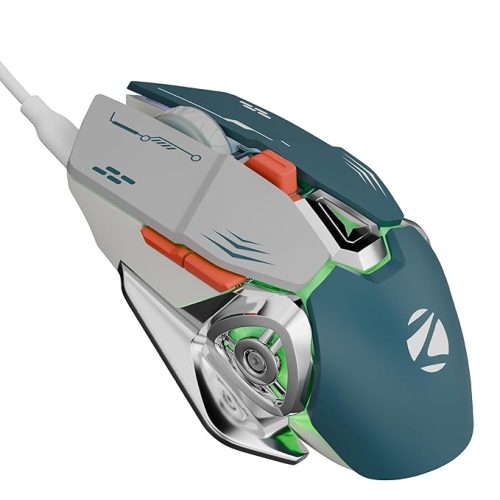
- Elevate your gaming experience with the EvoFox Blaze Programmable RGB Gaming Mouse, offering customizable DPI settings from 200 to 12800 for precise control and a 7000 FPS, 1000Hz polling rate for ultra-responsiveness.
EvoFox Blaze Ultra Value 8 Button Programmable Gaming Mouse with 1000Hz Polling Rate | Gaming Grade DPI 200 to 12800 | Ultra-Responsive 7000fps | RGB Lights with Music sync Mode | Windows Software
Original price was: ₹1,299.00.₹616.00Current price is: ₹616.00.
Description
-
Wired Gaming Mouse – Complete Guide and Top Picks
A wired gaming mouse is essential for competitive gaming and precision-based tasks. Wired connectivity ensures minimal latency, consistent response, and high reliability compared to wireless alternatives.
Ultra-Fast Response Time
One of the main advantages of a wired gaming mouse is its ultra-fast response:
-
High polling rates (up to 1000Hz) reduce input lag.
-
Instant reaction times enhance FPS, MOBA, and RTS gaming.
-
Stable wired connection eliminates interference issues.
Gamers rely on the wired gaming mouse for seamless performance and uninterrupted gameplay.
Customizable DPI Settings
Adjustable DPI is crucial for a wired gaming mouse:
-
DPI settings from 200 to 12,800 allow precision at all scales.
-
Lower DPI for sniping or detailed tasks.
-
Higher DPI for fast-paced movements and multi-monitor setups.
Customizable DPI enhances control and adaptability across different game genres.
Ergonomic Design
Comfort is key for long gaming sessions:
-
Contoured shapes fit natural hand posture.
-
Lightweight build reduces fatigue over extended periods.
-
Soft-touch and anti-slip materials prevent accidental slips.
An ergonomic wired gaming mouse ensures comfort without sacrificing performance.
Durable Build and Materials
Reliability is essential for professional gaming:
-
Braided cables resist fraying and tangling.
-
Gold-plated USB connectors ensure stable signal transmission.
-
Long-lasting switches rated for millions of clicks.
High-quality construction prolongs the life of a wired gaming mouse, making it a solid investment.
Programmable Buttons
Customization is key for advanced gaming:
-
Multiple programmable buttons for macros, shortcuts, and quick actions.
-
Fire buttons or side buttons for instant commands.
-
Software-enabled configuration for profile switching and button reassignment.
Programmable buttons turn a wired gaming mouse into a versatile tool for productivity and gaming.
RGB Lighting and Aesthetics
Modern wired gaming mouse designs feature RGB lighting:
-
Millions of color combinations and effects.
-
Sync lighting with music or game events.
-
Customizable via dedicated software for personalization.
RGB lighting adds style and immersion to the gaming setup.
Sensor Technology
The best wired gaming mouse uses advanced sensors:
-
Optical sensors for precise tracking on standard surfaces.
-
Laser sensors for high accuracy on glossy or reflective surfaces.
-
High-resolution sensors enable smoother movements and enhanced precision.
Accurate sensors improve both competitive gaming performance and everyday computer use.
Software and Customization
Most modern wired gaming mouse options come with software:
-
Configure DPI, lighting, and button assignments.
-
Save multiple profiles for different games.
-
Macro recording for repetitive tasks.
Software integration allows full control over the mouse’s performance and aesthetics.
Top Picks for Wired Gaming Mouse
1. EvoFox Blaze
-
DPI: 200–12800
-
RGB lighting with music sync mode
-
8 programmable buttons
2. Logitech G502 Hero
-
DPI up to 16,000
-
Adjustable weights
-
11 programmable buttons
3. Razer DeathAdder V2
-
20,000 DPI optical sensor
-
Ergonomic shape for extended use
-
Durable mechanical switches
4. Redragon M711 Cobra
-
10,000 DPI adjustable sensor
-
RGB lighting with 16.8M colors
-
7 programmable buttons
Choosing the Right Wired Gaming Mouse
When selecting a wired gaming mouse, consider:
-
Gaming Style: FPS, MOBA, or MMO.
-
Comfort: Ergonomic design for long sessions.
-
Precision: Sensor type and DPI range.
-
Customization: Programmable buttons and macros.
-
Build Quality: Durable switches, braided cable, and robust materials.
A suitable mouse improves gameplay, reduces fatigue, and enhances control.
Benefits of Wired Gaming Mouse
-
Zero Latency: Wired connectivity ensures instant response.
-
Consistent Performance: No interference or battery issues.
-
Customization: DPI, lighting, and macros enhance user experience.
-
Durable Construction: High-quality materials for long-lasting use.
-
Gaming Advantage: Optimal for competitive and professional gaming.
Wired Gaming Mouse – Advanced Features and Tips
A wired gaming mouse is an essential tool for gamers, programmers, and power users who require precision, speed, and reliability. Unlike wireless mice, a wired connection eliminates latency issues, ensuring instantaneous responses.
Precision and Accuracy
Precision is the cornerstone of a wired gaming mouse:
-
Optical and laser sensors provide pinpoint tracking.
-
DPI (dots per inch) adjustments allow fine-tuning for different tasks.
-
High polling rates reduce lag and improve responsiveness.
Gamers and professionals rely on the wired gaming mouse for accurate movements in competitive and creative applications.
Ergonomics for Long Gaming Sessions
Comfortable handling prevents strain:
-
Contoured designs support natural hand posture.
-
Lightweight construction reduces fatigue during extended play.
-
Soft-touch or textured grips ensure stability.
Using an ergonomic wired gaming mouse can significantly improve comfort and performance.
Durability and Build Quality
High-quality wired gaming mouse models are built to last:
-
Braided cables prevent fraying and tangling.
-
Mechanical switches rated for millions of clicks ensure longevity.
-
Sturdy plastic or metallic shells resist wear and tear.
Investing in a durable wired gaming mouse guarantees consistent performance for years.
Customization and Programmable Features
Customization is key for advanced users:
-
Multiple programmable buttons allow macros and shortcuts.
-
Profile switching lets users switch settings between games or apps.
-
Software suites enable adjustment of DPI, lighting, and button functions.
A wired gaming mouse with programmable buttons enhances both gaming and productivity.
RGB Lighting and Aesthetics
Modern gaming mice combine performance with visual appeal:
-
Millions of customizable colors and effects.
-
Sync lighting with music, games, or other devices.
-
Personalize your setup with unique lighting profiles.
RGB customization makes a wired gaming mouse not only functional but visually striking.
Sensor Types and Performance
The sensor defines the performance of a wired gaming mouse:
-
Optical sensors are precise on standard surfaces.
-
Laser sensors perform well on reflective surfaces.
-
High-DPI sensors allow smooth and responsive tracking.
Choosing the right sensor ensures the wired gaming mouse meets your performance requirements.
Software Integration
Software enhances the functionality of a wired gaming mouse:
-
Configure DPI levels, polling rates, and button mapping.
-
Create multiple profiles for different games or tasks.
-
Record macros to automate repetitive actions.
Comprehensive software support makes a wired gaming mouse versatile and user-friendly.
Recommended Wired Gaming Mouse Models
1. Corsair M65 RGB Elite
-
18,000 DPI sensor
-
8 programmable buttons
-
Customizable weight system
2. SteelSeries Rival 600
-
Dual sensor system
-
12,000 DPI
-
Ergonomic right-handed design
3. Razer Naga X
-
MMO-focused with 16 programmable buttons
-
16,000 DPI optical sensor
-
Lightweight and responsive
4. Logitech G502 Hero
-
16,000 DPI sensor
-
11 programmable buttons
-
Adjustable weight system
Budget Options
Even budget-friendly wired gaming mouse models offer solid performance:
-
Affordable optical mice with adjustable DPI
-
Durable construction and braided cables
-
Essential programmable buttons and RGB lighting
Budget wired gaming mouse options provide performance without breaking the bank.
Maintenance Tips
Proper care ensures longevity:
-
Regularly clean the mouse to prevent dust accumulation.
-
Check the cable for wear and avoid sharp bends.
-
Update software and firmware to maintain optimal performance.
Maintaining a wired gaming mouse extends its lifespan and reliability.
Advantages of Wired Gaming Mouse
-
Immediate Response: No lag for competitive gaming.
-
Consistent Performance: Stable connection without interference.
-
Customization: DPI, buttons, and lighting adjustments.
-
Durability: Built to withstand prolonged use.
-
Gaming Advantage: Optimized for professional and casual gamers.
Wired Gaming Mouse – Professional Guide and Advanced Features
A wired gaming mouse remains the preferred choice for competitive gamers, professionals, and enthusiasts who value precision, reliability, and speed. Unlike wireless mice, a wired connection ensures zero input lag, allowing for instantaneous response times during gameplay or work tasks.
High-Performance Sensors
The sensor type in a wired gaming mouse significantly affects tracking accuracy:
-
Optical Sensors: Excellent for smooth surfaces; provide precision for FPS, MOBA, and RTS games.
-
Laser Sensors: Can track on glass and reflective surfaces; suitable for versatile setups.
-
High DPI Sensors: Allow rapid cursor movement with minimal hand motion, essential for gaming.
Choosing the right sensor ensures your wired gaming mouse meets your specific needs.
DPI Adjustments
DPI (dots per inch) is a critical feature in any wired gaming mouse:
-
Low DPI (400–800) for precision tasks like sniping in FPS games.
-
Medium DPI (1000–2000) for general gaming and productivity.
-
High DPI (3000+) for ultra-fast movements and multitasking.
Adjustable DPI allows the wired gaming mouse to cater to multiple applications, from gaming to design.
Ergonomic Design
Comfort during extended use is crucial:
-
Contoured grips reduce fatigue for long sessions.
-
Textured or rubberized surfaces enhance handling.
-
Lightweight designs prevent strain without compromising control.
An ergonomic wired gaming mouse ensures comfort without sacrificing performance.
Customizable Buttons
Modern wired gaming mouse models often feature programmable buttons:
-
Assign macros for complex in-game actions.
-
Quick-access buttons improve workflow in productivity software.
-
Profile switching allows different configurations for multiple games.
Programmable buttons enhance the functionality of a wired gaming mouse, making it versatile for work and play.
RGB Lighting
RGB lighting is both aesthetic and functional:
-
Customizable colors to match gaming setups.
-
Lighting effects synced with music or games.
-
Visual feedback for active profiles or DPI levels.
A wired gaming mouse with RGB lighting adds style and personalization.
Durability and Build Quality
Durability ensures longevity for a wired gaming mouse:
-
Braided cables prevent tangling and breakage.
-
Mechanical switches rated for millions of clicks.
-
Strong plastic or aluminum shells resist wear.
High-quality materials make a wired gaming mouse reliable for extended usage.
Advanced Features
Professional wired gaming mouse models include:
-
High Polling Rate: Up to 1000Hz for ultra-responsive tracking.
-
Weight Customization: Adjustable weights for personalized balance.
-
Onboard Memory: Save profiles directly on the mouse.
-
Macro Recording: Automate repetitive tasks for efficiency.
Advanced features make the wired gaming mouse a professional-grade tool.
Recommended Professional Models
Logitech G502 Hero
-
16,000 DPI sensor
-
11 programmable buttons
-
Adjustable weight system
-
Durable braided cable
Razer DeathAdder V2
-
20,000 DPI optical sensor
-
8 programmable buttons
-
Lightweight ergonomic design
-
Speedflex cable for smooth gliding
SteelSeries Rival 600
-
Dual sensor system
-
Adjustable lift-off distance
-
12,000 CPI sensor
-
Durable and ergonomic design
Corsair M65 RGB Elite
-
18,000 DPI optical sensor
-
Aluminum frame
-
Customizable weight and RGB lighting
Budget Options
Even budget wired gaming mouse models offer solid performance:
-
Adjustable DPI for gaming and productivity.
-
Sturdy construction with reliable switches.
-
Essential programmable buttons and lighting options.
Budget-friendly wired gaming mouse options provide excellent value without compromising quality.
Software Integration
Software enhances a wired gaming mouse’s performance:
-
DPI adjustments and polling rate settings.
-
Button mapping and macro recording.
-
Profile management for multiple games.
-
RGB lighting customization and syncing.
Proper software ensures that your wired gaming mouse performs optimally across all tasks.
Maintenance Tips
To maintain your wired gaming mouse:
-
Clean the mouse regularly to remove dust and debris.
-
Avoid bending or twisting the cable.
-
Update drivers and software to maintain peak performance.
-
Store in a dust-free environment when not in use.
Following these tips ensures your wired gaming mouse lasts longer and performs consistently.
Advantages of a Wired Gaming Mouse
-
Zero Latency: Immediate response for competitive gaming.
-
Stable Connection: No interference from wireless signals.
-
Customizable: DPI, buttons, lighting, and macros.
-
Durable Build: Long-lasting switches and braided cables.
-
Gaming Advantage: Professional-grade performance for high-level gaming.
Buying Guide
When choosing a wired gaming mouse, consider:
-
Sensor Type: Optical or laser depending on surface and use.
-
DPI Range: Adjustable DPI for precision or speed.
-
Ergonomics: Comfort for long sessions.
-
Programmable Buttons: Essential for gaming macros.
-
Build Quality: Braided cables, durable switches, strong casing.
-
Software Features: Customization of DPI, lighting, and profiles.
-
Aesthetic Appeal: RGB lighting for personalization.
Wired Gaming Mouse – Setup, Tips, and Expert Recommendations
A wired gaming mouse is a critical tool for gamers, designers, and professionals seeking precision, speed, and reliability. In Part 4, we dive into setup tips, comparisons, maintenance, and FAQs to help you get the most from your wired gaming mouse.
Setting Up a Wired Gaming Mouse
Setting up a wired gaming mouse is straightforward but important for optimal performance:
-
Unbox and Inspect: Check the cable, sensor, buttons, and casing for defects.
-
Connect via USB: Plug the mouse directly into a USB port on your PC or laptop. Avoid hubs for minimal latency.
-
Install Software: Download the manufacturer’s software to customize DPI, lighting, and macros.
-
Adjust Settings: Set DPI sensitivity, polling rate, and button assignments to match your workflow or gaming style.
-
Test: Ensure the mouse moves smoothly across your mousepad, and all buttons respond correctly.
Proper setup ensures the wired gaming mouse performs reliably for gaming or productivity tasks.
Optimal Gaming Surface
The surface you use with a wired gaming mouse affects tracking and precision:
-
Cloth Mousepads: Provide consistent control and comfort for long sessions.
-
Hard Mousepads: Offer faster movement but require careful hand control.
-
Glass Desks: May reduce accuracy unless using a laser sensor mouse.
Using an appropriate surface maximizes the efficiency of your wired gaming mouse.
Cable Management
A gaming mouse requires attention to cable placement:
-
Avoid Tangling: Use a cable clip or routing system.
-
Minimize Drag: Ensure the cable does not snag on desk edges.
-
Braided Cables: Durable braided cables resist wear and reduce friction.
Good cable management enhances the lifespan and performance of your wired gaming mouse.
Comparisons with Wireless Gaming Mice
While wireless mice offer convenience, gaming mouse models have advantages:
-
Zero Latency: Wired mice provide instantaneous response, critical for FPS games.
-
No Battery Issues: You don’t need to recharge frequently.
-
Stable Connection: No signal interference in competitive environments.
-
Customizable Features: Programmable buttons, DPI, and RGB often come with wired models.
However, wireless mice are better for portability and cable-free setups. A gaming mouse is ideal for professionals who prioritize precision.
Ergonomic Tips
Long gaming or work sessions require proper ergonomics:
-
Adjust chair and desk height to maintain a neutral wrist position.
-
Keep your hand relaxed and avoid gripping too tightly.
-
Use a mouse with a contoured design to fit your hand comfortably.
-
Take breaks to reduce strain and prevent repetitive stress injuries.
Following ergonomic practices ensures the gaming mouse remains comfortable for extended use.
RGB and Customization Tips
Many gaming mouse models offer RGB customization:
-
Match lighting with your keyboard or PC setup.
-
Use color-coded DPI indicators for quick reference.
-
Sync lighting with in-game events or music for an immersive experience.
-
Limit overly bright effects to reduce eye strain during long sessions.
RGB customization enhances both aesthetics and functionality in a wired gaming mouse.
Maintenance and Cleaning
Maintaining a gaming mouse ensures longevity:
-
Clean the sensor with a soft brush or microfiber cloth.
-
Wipe the surface with a damp cloth to remove oils and dust.
-
Inspect the cable periodically for fraying.
-
Avoid eating or drinking near your mouse to prevent spills.
Regular maintenance keeps your gaming mouse precise and durable.
Recommended Accessories
Enhance your gaming mouse experience with these accessories:
-
Mouse Pads: Large, smooth, and anti-slip pads improve tracking.
-
Cable Clips: Prevent cable drag and tangling.
-
Wrist Rests: Reduce strain during long gaming sessions.
-
USB Hubs with Power: Ensure stable connectivity for multiple devices.
Accessories complement a gaming mouse to create a professional gaming or work setup.
Popular Models and Features
Logitech G Pro X Superlight
-
Ultra-lightweight at 63g
-
25,600 DPI Hero sensor
-
70-hour battery life (wired mode for latency-free gaming)
-
Minimalist RGB lighting
Razer Basilisk V3
-
20,000 DPI optical sensor
-
11 programmable buttons
-
Customizable scroll wheel resistance
-
Advanced Chroma RGB
SteelSeries Rival 3
-
8,500 CPI optical sensor
-
Durable mechanical switches rated for 60M clicks
-
1.8m rubberized cable
-
TrueMove Core sensor for accurate tracking
Corsair M65 RGB Elite
-
18,000 DPI sensor
-
Adjustable weight system
-
Aluminum frame for durability
-
8 programmable buttons and RGB lighting
These models highlight the variety of wired gaming mouse options for different budgets and needs.
FAQs
Q1: Are wired gaming mice better for FPS games?
Yes, zero latency and precise tracking make wired models ideal for FPS games.Q2: Do I need software for my gaming mouse?
Software allows DPI adjustment, macro recording, and RGB customization, though basic functionality works without it.Q3: How long do wired gaming mice last?
With proper maintenance, they can last 3–5 years or more, depending on build quality.Q4: Can I use a wired gaming mouse for productivity?
Absolutely. Programmable buttons, precise sensors, and ergonomic designs improve workflow efficiency.Q5: Do all gaming mice support Mac and Windows?
Most do, but check manufacturer compatibility for advanced software features.
Conclusion
A gaming mouse combines precision, durability, and customizable features for both gamers and professionals. With zero latency, programmable buttons, RGB customization, and ergonomic designs, these devices offer superior performance over many wireless alternatives. Investing in a quality gaming mouse ensures longevity, comfort, and competitive advantage for years to come.
-
-
-
-

Reviews
There are no reviews yet.