
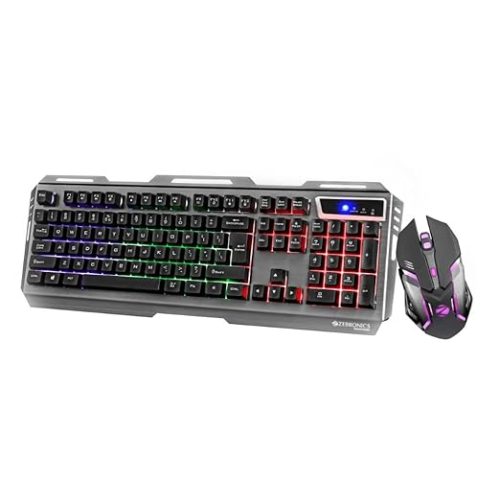
- Gaming mouse: ZEB-Transformer-M premium gaming mouse is designed for gamers who want the perfect fusion of high DPI, precision gaming along with LED lights.
ZEBRONICS-Transformer-M with a High-Performance Gold-Plated USB Mouse: 6 Buttons, Multi-Color LED Lights,High-Resolution Sensor with max 3600 DPI, and DPI Switch(Black)
Original price was: ₹549.00.₹399.00Current price is: ₹399.00.
Description
-
Zebronics Gaming Mouse – Ultimate Guide for Gamers
If you are a passionate gamer looking to upgrade your gaming setup, the Zebronics gaming mouse is designed to deliver precision, style, and comfort. With high DPI settings, ergonomic design, and LED features, this gaming mouse stands out for all types of gaming enthusiasts.
The Zebronics gaming mouse comes with a high-precision DPI sensor. This ensures accurate tracking during fast-paced games. Gamers can enjoy smooth movement without lag or cursor jumps, which is crucial for competitive gaming.
Ergonomic Design for Long Gaming Sessions
One of the key features of the Zebronics gaming mouse is its ergonomic design. Extended gaming sessions can be tiring, but this mouse reduces hand fatigue. Its contoured shape fits naturally in the hand, providing comfort for hours of uninterrupted gameplay.
The ergonomic design is also complemented by lightweight construction. You won’t feel strain even during marathon gaming sessions. The Zebronics gaming mouse supports both palm and claw grips, making it versatile for different playing styles.
LED Lighting for Immersive Gaming
A standout feature of the Zebronics gaming mouse is its 7-color breathing LED. The LED lights not only make your setup visually appealing but also enhance your gaming ambiance. The colors are customizable and provide a vibrant, immersive experience for gamers who want style along with performance.
High-Precision DPI Sensor
The Zebronics gaming mouse features a high-precision sensor with 3200 DPI. DPI (dots per inch) determines the sensitivity of your mouse. High DPI allows quick movements, while lower DPI ensures accuracy. The dedicated DPI switch on this mouse allows you to toggle between 1000, 1600, 2400, and 3200 DPI, giving you full control depending on your gaming requirements.
This flexibility makes the Zebronics gaming mouse suitable for different types of games. Whether you play first-person shooters, strategy games, or MOBAs, the DPI settings ensure your cursor is always precise.
Dedicated Buttons for Convenience
With six buttons, the Zebronics gaming mouse is designed for functionality. In addition to the standard left and right buttons, it features forward and backward buttons. These extra buttons are ideal for navigating web pages, performing macros in games, or executing complex commands quickly.
The dedicated DPI switch allows on-the-fly sensitivity adjustment. You don’t need to pause your game to change settings. This feature is especially useful in competitive scenarios where milliseconds matter.
Plug-and-Play Compatibility
One of the reasons the Zebronics gaming mouse is popular among gamers is its plug-and-play design. No additional software installation is required. Simply connect it to your PC or laptop via USB, and it’s ready to use.
It works on most surfaces, eliminating the need for specialized mouse pads. This makes it convenient for gamers who want a versatile and reliable mouse without extra setup hassles.
Gaming Performance
Performance is the heart of any gaming accessory. The Zebronics gaming mouse delivers smooth tracking, accurate clicks, and responsive buttons. The lightweight design, combined with the high-precision sensor, ensures fast response times.
Whether you are gaming for fun or competing professionally, the Zebronics gaming mouse gives you the edge. Its ergonomic design, multiple DPI levels, and customizable LED lighting contribute to an enhanced gaming experience.
Durability and Build Quality
The Zebronics gaming mouse is built with premium materials to ensure durability. The buttons are tested for millions of clicks, ensuring long-term reliability. The braided cable provides strength and prevents tangling, while the mouse body resists scratches and wear.
Advantages at a Glance
-
High-precision 3200 DPI sensor
-
7-color breathing LED lighting
-
Ergonomic design for long sessions
-
Six functional buttons, including forward/backward buttons
-
Dedicated DPI switch with multiple sensitivity levels
-
Plug-and-play installation
-
Works on most surfaces
-
Durable braided cable and high-quality build
Why Choose Zebronics Gaming Mouse?
The Zebronics gaming mouse stands out because it combines performance, style, and affordability. For gamers who want a reliable mouse without spending a fortune, this is a perfect choice.
It is suitable for both casual gamers and competitive players. With features like adjustable DPI, dedicated buttons, ergonomic design, and LED lighting, it meets all essential requirements of a modern gaming mouse.
Zebronics Gaming Mouse – Part 2: Advanced Features and User Experience
The Zebronics gaming mouse is not just about aesthetics; it’s designed for performance. Gamers require precision, reliability, and comfort, and this mouse delivers all of that.
Customizable DPI for Every Gaming Scenario
The Zebronics gaming mouse features a dedicated DPI switch with levels of 1000, 1600, 2400, and 3200 DPI. This allows you to adjust sensitivity depending on the game. Lower DPI is ideal for sniping in FPS games, while higher DPI ensures quick movement across large screens in strategy games.
This customization ensures that you can react instantly during high-pressure scenarios. For professional gamers, the ability to toggle DPI mid-game is crucial, and the Zebronics gaming mouse handles it effortlessly.
LED Lighting and Visual Appeal
The 7-color breathing LED adds more than just visual appeal. It creates a gaming atmosphere that enhances the immersive experience. Many gamers prefer RGB lighting because it sets the tone for intense gaming sessions.
The LED system in the Zebronics gaming mouse is designed to be subtle yet striking. It doesn’t distract during gameplay but enhances your setup aesthetics. Gamers can coordinate LED colors with other peripherals to create a synchronized gaming environment.
Ergonomic Comfort and Longevity
Comfort is essential during long gaming sessions. The Zebronics gaming mouse is ergonomically designed to fit naturally in your hand. Its contoured shape supports different grip styles, whether palm, claw, or fingertip.
The lightweight body reduces strain on the wrist and fingers. This is particularly important for gamers who play for hours without breaks. The Zebronics gaming mouse combines comfort with durability, making it ideal for daily use.
Six Buttons for Maximum Efficiency
With six programmable buttons, the Zebronics gaming mouse enhances gaming efficiency. Standard left and right buttons, scroll wheel, forward/backward buttons, and DPI switch give you full control.
These buttons can be mapped for various in-game actions or macros. This flexibility allows you to perform complex commands quickly, giving you a competitive edge. Dedicated forward and backward buttons also make navigating applications and web pages faster.
Plug-and-Play Convenience
The Zebronics gaming mouse is simple to set up. It doesn’t require additional software installation. Connect it via USB to your PC or laptop, and it’s ready to use.
Its plug-and-play feature makes it suitable for gamers who frequently switch between devices. This mouse works on most surfaces, so you don’t need a specialized mouse pad. This versatility enhances convenience and portability.
Durability and Build Quality
Durability is a key feature of the Zebronics gaming mouse. The buttons are tested for millions of clicks, ensuring long-lasting performance. The braided cable adds strength and prevents tangling.
The high-quality plastic body resists scratches and wear. The mouse is designed to withstand heavy usage, making it reliable for both casual and competitive gamers.
Ideal for Gamers and Professionals
Whether you’re a casual gamer or a professional, the Zebronics gaming mouse adapts to your needs. Its customizable DPI, ergonomic design, and dedicated buttons make it suitable for various gaming genres, from FPS and RTS to MOBA games.
Optimizing Your Gaming Setup
To get the most out of the Zebronics gaming mouse, pair it with a suitable mouse pad. Even though it works on most surfaces, a smooth gaming pad enhances precision and response time.
Adjust the DPI based on your game type. For high-speed games, use higher DPI. For precision-based games, lower DPI settings work best. The customizable buttons can be mapped for frequently used actions to save time and improve performance.
Comparisons with Other Gaming Mice
Compared to standard office mice, the Zebronics gaming mouse excels in speed, precision, and durability. Compared to other gaming mice in its price range, it offers a combination of ergonomic comfort, LED customization, and a high-precision sensor, making it one of the best options for budget-conscious gamers.
While premium gaming mice may offer extra software features, the Zebronics gaming mouse provides core functionalities without unnecessary complexity. Its plug-and-play system ensures that you spend more time gaming rather than configuring settings.
Key Advantages
-
3200 DPI sensor for high precision
-
Adjustable DPI for different gaming scenarios
-
7-color breathing LED lighting
-
Ergonomic design for long sessions
-
Six programmable buttons, including forward/backward
-
Plug-and-play setup, no extra software required
-
Works on most surfaces
-
Durable braided cable and scratch-resistant body
User Feedback and Reviews
Many users praise the Zebronics gaming mouse for its reliability, comfort, and performance. Gamers report improved precision and responsiveness compared to standard mice. The ergonomic design reduces hand fatigue, making long sessions more enjoyable.
LED lighting is also appreciated for adding style to gaming setups. Users note that the plug-and-play functionality is convenient for switching between laptops or PCs.
Zebronics Gaming Mouse – Part 3: Tips, FAQs, and Expert Insights
The Zebronics gaming mouse is designed for gamers who demand precision, speed, and comfort. Beyond features, understanding how to maximize its potential ensures you get the best gaming experience.
Tips for Optimizing Your Zebronics Gaming Mouse
1. Customize DPI Settings:
Adjust the DPI using the dedicated switch. High DPI is perfect for fast-paced games, while lower DPI is ideal for accuracy-heavy games. Toggle between levels during gameplay to adapt to different scenarios.2. Ergonomic Setup:
Ensure your hand rests naturally on the mouse. The ergonomic design supports various grip styles – palm, claw, and fingertip. Proper hand placement reduces fatigue during long gaming sessions.3. Use Forward and Backward Buttons Efficiently:
Map frequently used actions or commands to the dedicated forward and backward buttons. This increases efficiency in games and can also speed up web navigation.4. Pair with a Quality Mouse Pad:
Although the Zebronics gaming mouse works on most surfaces, using a smooth mouse pad improves precision and glide. A pad with minimal friction helps maintain consistent tracking.5. Cable Management:
The braided USB cable is durable, but keeping it untangled improves mouse movement. Use cable clips or position your PC to avoid accidental snags.Frequently Asked Questions (FAQs)
Q1: Is the Zebronics gaming mouse suitable for all types of games?
Yes. Its customizable DPI, high-precision sensor, and ergonomic design make it ideal for FPS, MOBA, RTS, and casual gaming.Q2: Does it require software installation?
No. The Zebronics gaming mouse is plug-and-play. Connect it via USB, and it works instantly on Windows and macOS devices.Q3: Can it be used on laptops?
Absolutely. Its compact design and USB connectivity make it fully compatible with laptops, desktops, and even some gaming consoles.Q4: How durable is the mouse?
The buttons are tested for millions of clicks, and the braided cable adds durability. The scratch-resistant body ensures it lasts long under normal and intense usage.Q5: Are the LED lights customizable?
The 7-color breathing LED is fixed, but it adds aesthetic appeal and creates an immersive gaming environment.Expert Insights
Professional gamers often emphasize the importance of a responsive mouse. The Zebronics gaming mouse stands out in its price range because it balances precision, comfort, and aesthetics without overcomplicating features.
The six-button layout allows for macro programming and enhanced control, giving gamers a competitive advantage in tournaments and high-speed gameplay.
Comparing with Premium Gaming Mice
While high-end gaming mice offer extensive software customization and ultra-high DPI sensors, the Zebronics gaming mouse provides core features essential for competitive gameplay. Its combination of 3200 DPI sensor, ergonomic design, and LED lighting offers excellent value.
For gamers on a budget, it’s a reliable choice that doesn’t compromise on precision or comfort. Its plug-and-play nature means you can start gaming immediately without spending time configuring software settings.
Maintenance and Care Tips
-
Regular Cleaning:
Dust and debris can affect sensor performance. Use a soft cloth or compressed air to clean the mouse regularly. -
Avoid Moisture:
Keep the mouse dry to prevent damage to internal components. -
Check Cable Integrity:
Ensure the braided cable is not frayed or bent excessively to maintain durability. -
Software Updates:
Although the mouse is plug-and-play, keeping your system drivers updated can enhance compatibility and performance.
Gaming Setups with Zebronics Mouse
Pairing the Zebronics gaming mouse with an ergonomic keyboard, large mouse pad, and high-refresh-rate monitor enhances the gaming experience. The LED lights can synchronize with other peripherals to create a visually immersive setup.
The mouse’s responsiveness and customizable DPI make it a good fit for both competitive gamers and casual players who want reliable performance without breaking the bank.
Advantages Recap
-
High Precision: 3200 DPI sensor ensures accurate tracking.
-
Customizable DPI: Adapt sensitivity for any game.
-
Ergonomic Design: Supports different grip styles.
-
LED Aesthetics: 7-color breathing effect enhances setup.
-
Durable Build: Scratch-resistant body and braided cable.
-
Multiple Buttons: Forward, backward, DPI switch, and standard buttons for efficient control.
-
Plug-and-Play: No software required, compatible with multiple systems.
Real-World Applications
Apart from gaming, the Zebronics gaming mouse can be used for professional tasks. Graphic designers, video editors, and programmers benefit from its precise tracking and multiple programmable buttons. The forward/backward buttons can be mapped to shortcuts, improving workflow efficiency.
Why Choose Zebronics Gaming Mouse
-
Affordable yet feature-rich
-
Durable and long-lasting
-
Suitable for extended gaming sessions
-
Easy to set up and use
-
Offers a stylish RGB aesthetic
Zebronics Gaming Mouse – Part 4: Buying Guide, Comparisons, and Final Insights
The Zebronics gaming mouse has established itself as a reliable, budget-friendly option for gamers who want precision, durability, and style. In this part, we’ll cover how it compares to competitors, why it’s worth buying, and practical tips for making the most of it.
Buying Guide: Choosing the Right Zebronics Gaming Mouse
When looking for a gaming mouse, several factors matter. The Zebronics gaming mouse offers key features that gamers should consider before purchasing:
1. DPI and Sensitivity:
The 3200 DPI sensor of the Zebronics mouse provides accurate tracking. Beginners may prefer lower DPI for precision, while professional gamers might increase it for faster response times.2. Ergonomic Design:
Comfort is crucial for long sessions. The Zebronics mouse is built to fit natural hand positions. Choose a grip style that suits your gaming: palm, claw, or fingertip.3. Buttons and Customization:
Six buttons, including forward/backward and a dedicated DPI switch, allow flexibility. While higher-end mice offer software-based macros, this mouse gives essential hardware control at an affordable price.4. LED Lighting:
The 7-color breathing LED enhances aesthetics. While not customizable, it adds visual appeal to gaming setups and is ideal for streamers or enthusiasts who want a stylish desk.5. Durability:
The braided cable and scratch-resistant body ensure longevity. Users can rely on this mouse for daily use without worrying about wear and tear.6. Plug-and-Play:
No software installation is needed. The Zebronics mouse works seamlessly with Windows, macOS, and some laptops.Comparisons with Other Budget Gaming Mice
Zebronics vs. Redragon:
-
Redragon mice often have higher DPI and software-based customization.
-
Zebronics is simpler, plug-and-play, and budget-friendly.
-
Both have RGB lighting, but Zebronics focuses on essential gaming features rather than extra software.
Zebronics vs. Logitech Entry-Level Mice:
-
Logitech offers better ergonomics and professional-grade sensors but at a higher cost.
-
Zebronics delivers solid performance at a fraction of the price, making it ideal for casual and mid-level gamers.
Zebronics vs. HP/OEM Mice:
-
HP or generic gaming mice may lack consistency in DPI and durability.
-
Zebronics provides reliable sensors, braided cable, and a long-lasting design.
Pros and Cons of Zebronics Gaming Mouse
Pros:
-
Affordable without compromising essential gaming features.
-
High-precision 3200 DPI sensor.
-
Ergonomic for extended gaming sessions.
-
Six buttons including forward/backward and DPI switch.
-
7-color breathing LED for aesthetics.
-
Durable braided cable and scratch-resistant body.
-
Plug-and-play, compatible with multiple systems.
Cons:
-
Limited LED customization compared to high-end mice.
-
No software for advanced macro programming.
-
DPI max (3200) may not satisfy professional esports players seeking ultra-high sensitivity.
Best Use Cases for Zebronics Gaming Mouse
-
Casual Gaming:
Perfect for FPS, MOBA, or RPG games where precision and quick response matter. -
Professional Tasks:
Graphic designers and video editors benefit from six programmable buttons and smooth tracking. -
Home Office Use:
The ergonomic design makes it suitable for productivity tasks, reducing wrist strain. -
Travel-Friendly Gaming:
Lightweight and plug-and-play features make it easy to carry for LAN parties or gaming on laptops.
Maintenance Tips
-
Clean Regularly: Wipe the mouse body and sensor to avoid dust affecting performance.
-
Check Cable: Ensure the braided cable remains untangled to maintain smooth movement.
-
Avoid Moisture: Keep away from liquids to protect internal components.
-
Surface Matters: While it works on most surfaces, using a mouse pad ensures optimal tracking.
-

Reviews
There are no reviews yet.