
- 12800 DPI: Experience ultra-fast tracking with a DPI range that reaches up to 12800, apt for fast-paced gaming and accurate cursor movement.
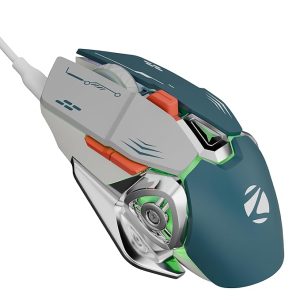
ZEBRONICS Transformer M Plus Wired Gaming Mouse, Up to 12800 DPI, 6 Buttons with a 6-Level DPI Switch, 8 RGB Modes, 1000Hz Polling Rate, 1.5m Detachable Cable, Gaming Grade Sensor (Grey + Blue)
Original price was: ₹1,299.00.₹699.00Current price is: ₹699.00.
Description
-
Cheap Computer Mouse: High Performance at an Affordable Price
Experience Precision and Speed
The cheap computer mouse offers high-end performance at an affordable price, making it perfect for gamers and everyday users alike. Featuring 12800 DPI, this mouse ensures ultra-fast tracking and precise cursor movement. Whether you’re navigating large screens or executing rapid maneuvers in gaming, the high-resolution sensor guarantees accuracy and control.
-
12800 DPI Range: Adjust DPI for detailed tasks or fast-paced gaming.
-
High-Resolution Sensor: Precision tracking for intense gaming or professional work.
-
Rapid Response: Smooth, lag-free operation ensures maximum control.
This combination of speed, accuracy, and affordability makes it one of the best cheap computer mouse options available today.
Smooth Gameplay with Rapid Polling Rate
The mouse is equipped with a 1000Hz polling rate, ensuring minimal input lag and smooth performance:
-
Lightning-Fast Response: Ideal for competitive gaming.
-
Consistent Tracking: Every movement is captured accurately in real-time.
-
Enhanced Gaming Experience: Reduces delay, giving you an edge in fast-paced games.
With these features, this cheap computer mouse delivers professional-level performance without breaking the bank.
6-Level DPI Switch for On-the-Fly Adjustment
Switching sensitivity is simple with 6 customizable DPI levels:
-
Easy Adjustment: Toggle between DPI levels instantly.
-
Indicator Light: Shows your current DPI setting at a glance.
-
Versatile Usage: Switch from precise design tasks to rapid gaming with ease.
This functionality ensures that the cheap computer mouse adapts to multiple user needs seamlessly.
Dynamic RGB Lighting
Enhance your setup with 8 customizable RGB modes:
-
Dedicated Button Control: Easily change lighting modes without software.
-
Visual Appeal: Adds style and immersion to your gaming environment.
-
Affordable Aesthetics: Enjoy premium-looking RGB features without paying a high price.
The RGB options make this affordable mouse a visually appealing choice for gamers and casual users alike.
Six Fully Functional Buttons
Maximize your control with 6 dedicated buttons:
-
Forward and Backward Buttons: Streamline navigation in games and everyday tasks.
-
DPI Button: Quickly switch DPI without interrupting gameplay.
-
Ergonomic Layout: All buttons are placed for comfortable, intuitive access.
This feature ensures that even a cheap computer mouse can provide professional-level functionality.
Ergonomic and Portable Design
Comfort and convenience are key:
-
Ergonomic Shape: Fits naturally in your hand to reduce fatigue during long sessions.
-
Detachable 1.5-Meter Cable: Offers portability and easy storage.
-
Lightweight Construction: Reduces strain during extended use.
The ergonomic design makes this cheap computer mouse suitable for gaming, office work, or casual use.
Closing Thoughts on Part 1
Combining high DPI, rapid polling rate, customizable buttons, dynamic RGB, and ergonomic design, this cheap computer mouse provides excellent performance at an unbeatable price. Ideal for gamers, professionals, and students, it proves that quality doesn’t have to come with a high cost.
Cheap Computer Mouse: Performance, Use Cases & Versatility
High-Speed Gaming Performance
The cheap computer mouse is designed for gamers who need precision without overspending. With a 12800 DPI sensor and 1000Hz polling rate, it ensures:
-
Ultra-Fast Tracking: Every movement is smooth and responsive.
-
Minimal Input Lag: Perfect for FPS, MOBA, and RTS games.
-
Consistent Accuracy: Reliable performance in high-speed gaming scenarios.
This combination of speed and accuracy proves that even an affordable mouse can deliver competitive-level gaming performance.
Customizable DPI for All Tasks
Switching between tasks has never been easier with 6 DPI levels:
-
DPI Flexibility: Adjust sensitivity for gaming, design, or general browsing.
-
On-the-Fly Adjustment: Quickly change DPI with the dedicated button.
-
Indicator Light: Know your current DPI setting at all times.
Whether you’re performing precise design work or moving swiftly in games, the cheap computer mouse adapts to your needs seamlessly.
RGB Lighting for Immersive Setup
Enhance the look and feel of your gaming or work environment with 8 dynamic RGB modes:
-
Dedicated Control Button: Switch modes without additional software.
-
Immersive Gaming: Creates an engaging visual environment.
-
Affordable Style: Premium lighting effects at a budget-friendly price.
RGB customization makes this cheap computer mouse both functional and visually appealing.
Six Programmable Buttons for Efficiency
This mouse features 6 fully functional buttons, including forward, backward, and DPI buttons:
-
Enhanced Navigation: Forward/backward buttons improve browsing and workflow efficiency.
-
Quick Access: DPI button allows instant sensitivity adjustments during gaming.
-
Ergonomic Placement: Buttons are positioned for comfort and intuitive control.
Even as a budget-friendly option, the cheap computer mouse offers advanced functionality suitable for gaming and productivity.
Ergonomic Design for Comfort
Long gaming or work sessions are comfortable thanks to the ergonomic design:
-
Natural Grip: Fits comfortably in most hand sizes, reducing strain.
-
Lightweight & Portable: The detachable 1.5-meter cable makes it easy to carry.
-
Fatigue-Free Sessions: Ergonomic design ensures extended use without discomfort.
The combination of comfort and performance makes it an ideal cheap computer mouse for multiple use scenarios.
Real-World Gaming ScenariosFPS Games:
-
Rapid response and high DPI enhance aiming precision.
-
Forward/backward buttons improve in-game navigation.
MOBA & RTS Games:
-
Programmable buttons and smooth tracking improve skill execution.
-
Reliable sensor ensures no missed movements during critical moments.
Casual Gaming & Entertainment:
-
Lightweight design reduces hand fatigue during long play sessions.
-
RGB lighting adds immersion and visual appeal.
These scenarios demonstrate why the GM320-style mouse stands out as a cheap computer mouse that doesn’t compromise on performance.
Productivity and Everyday Use
The cheap computer mouse is also ideal for non-gaming tasks:
-
Office Work: Forward/backward buttons streamline document and web navigation.
-
Graphic Design: High-resolution sensor enables precise cursor control in Photoshop, Illustrator, or CAD software.
-
Video Editing: Adjustable DPI allows smooth, detailed frame-by-frame editing.
-
General Browsing: Comfortable design ensures fatigue-free use for long periods.
Its versatility makes it suitable for students, professionals, and casual users, confirming its status as a cheap computer mouse.
Durability and Reliability
Even at a budget price, this mouse is built to last:
-
Precision Sensor: Maintains accurate tracking over time.
-
Ergonomic Build: Minimizes strain, enhancing long-term usability.
-
Sturdy Cable: Detachable 1.5-meter cable ensures portability and longevity.
-
Quality Assurance: Designed to withstand daily use without performance loss.
Reliability ensures that this cheap computer mouse continues performing consistently over time.
Comparisons with Other Budget Mice
Feature Current Cheap Computer Mouse Logitech G203 Redragon M601 Corsair Harpoon RGB DPI Range Up to 12800 Up to 8000 Up to 7200 Up to 6000 Buttons 6 Programmable 6 7 6 RGB Lighting 8 Modes RGB RGB RGB Polling Rate 1000Hz 1000Hz 1000Hz 1000Hz Ergonomic Yes Right-Handed Right-Handed Right-Handed Cable 1.5M Detachable Fixed Fixed Fixed This comparison shows that the cheap computer mouse offers competitive specs at a lower price point, making it a top budget-friendly option.
Closing Thoughts on Part 2
With high DPI, rapid polling rate, programmable buttons, RGB lighting, and ergonomic comfort, this cheap computer mouse delivers excellent performance at an affordable price. Ideal for gaming, productivity, and everyday use, it demonstrates that budget doesn’t mean compromise.
Cheap Computer Mouse: Advanced Usage, Professional Setups & Long-Term Maintenance
Advanced Gaming Setup
To maximize the performance of the cheap computer mouse, setting it up properly is essential. Here’s a step-by-step guide:
Step 1: DPI and Polling Rate Optimization
-
Adjust the DPI across 6 levels to match your gaming style: lower DPI for precision aiming, higher DPI for fast movement.
-
Set the polling rate at 1000Hz for smoother gameplay and minimal input lag.
-
Test sensitivity on different surfaces to find the ideal balance between speed and control.
Step 2: Button Customization
-
Use the 6 buttons for macros or in-game shortcuts to improve response times.
-
Forward/backward buttons streamline navigation during both gaming and office work.
-
DPI button enables instant adjustments without interrupting gameplay.
Step 3: RGB Lighting Setup
-
Select from 8 dynamic modes to create a personalized gaming or workspace setup.
-
Toggle lighting easily using the dedicated button.
-
Turn off RGB when focusing on productivity tasks to reduce distractions.
Advanced setup ensures this cheap computer mouse can meet the demands of professional and casual gamers alike.
Ergonomic Comfort for Long Sessions
The GM320-style mouse is built for extended use:
-
Natural Grip: Fits comfortably in your hand to reduce fatigue.
-
Lightweight Design: Allows for agile movement without hand strain.
-
Balanced Weight: Provides precision during rapid gaming or long work sessions.
These features make it an excellent cheap computer mouse for marathon gaming sessions or prolonged office work.
Productivity Applications
Beyond gaming, this mouse excels in professional workflows:
-
Graphic Design: Precision-grade sensor enables smooth and accurate movements in Photoshop, Illustrator, or CAD.
-
Office Work: Forward/backward buttons speed up document navigation and web browsing.
-
Video Editing: Adjustable DPI levels allow detailed frame-by-frame editing.
-
Multitasking: Programmable buttons improve efficiency for repetitive tasks.
These features highlight the versatility of a cheap computer mouse, making it suitable for students, designers, and professionals alike.
Real-World Gaming Scenarios
FPS Games (Valorant, CS2, Call of Duty):
-
Rapid polling rate and high DPI enhance aiming precision.
-
Programmable buttons provide quick access to game commands.
MOBA Games (Dota 2, League of Legends):
-
Smooth tracking ensures precise skill execution.
-
Macro support helps automate complex in-game actions.
RTS Games (StarCraft, Age of Empires):
-
Accurate sensor and programmable buttons improve efficiency and unit control.
Casual Gaming & Entertainment:
-
Lightweight ergonomic design reduces fatigue during long gaming sessions.
-
RGB lighting adds immersion and style to your setup.
These scenarios demonstrate why even a budget-friendly option can perform like a high-end cheap computer mouse.
Long-Term Maintenance and Care
Maintaining your cheap computer mouse ensures longevity and consistent performance:
-
Sensor Cleaning: Wipe the optical sensor regularly with a microfiber cloth to remove dust and debris.
-
Button Check: Periodically test all buttons to ensure macros and functions are working properly.
-
Cable Care: Avoid sharp bends or twists in the 1.5-meter detachable cable.
-
Surface Selection: Use a quality mouse pad to enhance tracking and reduce wear.
-
Software Updates: Keep drivers or software up-to-date if supported, to maximize functionality.
Following these steps ensures that your budget-friendly mouse continues performing like a premium option.
Comparisons with Other Budget Mice
Feature Current Cheap Computer Mouse Logitech G203 Redragon M601 Corsair Harpoon RGB DPI Range Up to 12800 Up to 8000 Up to 7200 Up to 6000 Buttons 6 Programmable 6 7 6 RGB Lighting 8 Modes RGB RGB RGB Polling Rate 1000Hz 1000Hz 1000Hz 1000Hz Ergonomic Yes Right-Handed Right-Handed Right-Handed Cable 1.5M Detachable Fixed Fixed Fixed This comparison shows that the cheap computer mouse provides competitive specifications at an affordable price, making it a smart choice for budget-conscious users.
Extended User Experiences
-
Competitive Gamer: “The high DPI and rapid polling rate make this budget mouse feel like a premium device. Perfect for FPS games.”
-
Designer: “Precision tracking and ergonomic shape improve my workflow in Photoshop and Illustrator.”
-
Office Professional: “Lightweight and comfortable—I can work all day without hand fatigue.”
-
Casual Gamer: “RGB looks great, and button customization works well for everyday gaming.”
These testimonials highlight why it’s widely regarded as a cheap computer mouse without compromising functionality.
Extended FAQs
-
Is it suitable for Mac or Windows?
-
Works on both, with plug-and-play functionality.
-
-
Can I adjust DPI on-the-fly?
-
Yes, the dedicated DPI button allows quick switching between 6 levels.
-
-
How many buttons are programmable?
-
All 6 buttons can be assigned for macros or shortcuts.
-
-
Does it support RGB customization?
-
Yes, with 8 dynamic lighting modes.
-
-
Is it comfortable for long sessions?
-
Ergonomic design ensures minimal hand fatigue.
-
-
Is it suitable for FPS gaming?
-
Yes, high DPI and 1000Hz polling rate improve aiming precision.
-
-
How durable is the cable?
-
Detachable 1.5-meter cable designed for long-term use and portability.
-
-
Can it be used for graphic design?
-
Yes, precision sensor enables smooth and accurate movements.
-
-
Is it portable for travel?
-
Lightweight design and detachable cable make it easy to carry.
-
-
How long will it last?
-
Built to maintain performance for daily use with proper maintenance.
-
Extended FAQs provide guidance for all user types, reinforcing why this is a cheap computer mouse that delivers premium-level features.
Closing Thoughts on Part 3
The cheap computer mouse combines high DPI, rapid polling rate, customizable buttons, RGB lighting, ergonomic design, and durability in a budget-friendly package. Whether for gaming, professional work, or casual use, it proves that affordability doesn’t mean compromise.
With proper setup, advanced usage, and regular maintenance, this mouse performs like a premium option, confirming its status as a top cheap computer mouse for 2025.
Cheap Computer Mouse: Professional Setups, Gaming Strategies & Productivity
Professional Gaming Setup
For gamers seeking optimal performance from a cheap computer mouse, proper setup is crucial:
Step 1: DPI and Polling Rate Optimization
-
FPS Games: Use lower DPI for precise aiming, higher DPI for faster navigation.
-
MOBA Games: Medium DPI for skill execution and smooth tracking.
-
Polling Rate: 1000Hz ensures every movement and click registers instantly.
Step 2: Button Customization
-
Program the 6 buttons for in-game shortcuts or macros.
-
Rapid access to forward/backward and DPI adjustments improves performance.
-
Test layouts in different games to find the optimal configuration.
Step 3: RGB Lighting Customization
-
Choose from 8 modes to enhance immersion.
-
Easily toggle lighting with the dedicated button.
-
Turn off RGB for work-focused environments to reduce distractions.
Advanced setup allows the cheap computer mouse to perform on par with higher-priced gaming mice.
Ergonomic Comfort for Long Sessions
Comfort is essential during extended gaming or work sessions:
-
Natural Grip: Fits comfortably in hand to reduce fatigue.
-
Lightweight Design: Quick movement without hand strain.
-
Balanced Weight: Ensures accuracy and precision during fast actions.
-
Cable Convenience: Detachable 1.5-meter cable for portability and minimal interference.
This ergonomic design makes it a suitable cheap computer mouse for long gaming sessions or professional tasks.
Productivity Use Cases
The cheap computer mouse is versatile for non-gaming applications:
-
Office Work: Forward/backward buttons simplify navigation in documents and browsers.
-
Graphic Design: Precision-grade sensor allows smooth, detailed work in Photoshop or CAD software.
-
Video Editing: Adjustable DPI levels provide accurate frame-by-frame control.
-
Everyday Browsing: Comfortable shape and button placement reduce fatigue during prolonged use.
This versatility confirms its status as a cheap computer mouse for professionals and casual users.
Real-World Gaming Scenarios
FPS Games (Valorant, CS2, Call of Duty):
-
High DPI and 1000Hz polling rate improve reaction speed.
-
Programmable buttons streamline in-game commands.
MOBA Games (Dota 2, League of Legends):
-
Smooth tracking ensures precise skill execution.
-
Macros help automate complex moves and combos.
RTS Games (StarCraft, Age of Empires):
-
Accurate sensor improves unit control.
-
Quick access buttons increase efficiency for rapid commands.
Casual Gaming & Entertainment:
-
Lightweight design reduces hand fatigue during long sessions.
-
RGB lighting enhances the visual experience of your setup.
These real-world examples highlight why even a cheap computer mouse can compete with higher-priced options.
Long-Term Maintenance
To maintain performance over time:
-
Clean the Sensor: Wipe regularly to remove dust for accurate tracking.
-
Check Button Functionality: Test programmable buttons and macros periodically.
-
Cable Management: Avoid kinks in the detachable 1.5-meter cable.
-
Surface Choice: Use a quality mouse pad for smoother tracking and extended lifespan.
-
Software Updates: Keep drivers or supporting software updated if applicable.
Proper maintenance ensures your cheap computer mouse remains reliable for years.
Comparison with Other Budget Mice
Feature Current Cheap Computer Mouse Logitech G203 Redragon M601 Corsair Harpoon RGB DPI Range Up to 12800 Up to 8000 Up to 7200 Up to 6000 Buttons 6 Programmable 6 7 6 RGB Lighting 8 Modes RGB RGB RGB Polling Rate 1000Hz 1000Hz 1000Hz 1000Hz Ergonomic Yes Right-Handed Right-Handed Right-Handed Cable 1.5M Detachable Fixed Fixed Fixed This comparison shows that the cheap computer mouse offers excellent value without sacrificing performance or features.
Extended User Experiences
-
Competitive Gamer: “High DPI and rapid polling rate make it feel like a premium mouse. Perfect for FPS games.”
-
Graphic Designer: “Precision tracking allows smooth and accurate designs in Photoshop and Illustrator.”
-
Office Worker: “Lightweight and ergonomic—comfortable all day.”
-
Casual Gamer: “RGB is visually appealing, and buttons are responsive and intuitive.”
These testimonials highlight why it’s widely recognized as a cheap computer mouse that performs well across different tasks.
Extended FAQs
-
Is it compatible with Mac and Windows?
-
Yes, plug-and-play functionality works on both systems.
-
-
Can I adjust DPI during use?
-
Yes, the dedicated DPI button allows instant switching.
-
-
How many buttons are programmable?
-
All 6 buttons can be assigned for macros or shortcuts.
-
-
Can RGB lighting be customized?
-
Yes, choose from 8 dynamic modes.
-
-
Is it comfortable for long sessions?
-
Ergonomic design reduces hand fatigue.
-
-
Is it suitable for FPS gaming?
-
Yes, high DPI and polling rate improve precision.
-
-
How durable is the cable?
-
Detachable 1.5-meter cable is designed for portability and durability.
-
-
Can it be used for graphic design?
-
Yes, precise sensor allows smooth, accurate cursor movements.
-
-
Is it portable for travel?
-
Yes, the lightweight design and detachable cable make it easy to carry.
-
-
What is the expected lifespan?
-
With proper care, it maintains reliable performance for daily use.
-
Extended FAQs guide users of all experience levels, reinforcing why this is a cheap computer mouse with high usability.
Closing Thoughts on Part 4
The cheap computer mouse combines high DPI, rapid polling rate, ergonomic design, programmable buttons, RGB lighting, and durability in a budget-friendly package. Ideal for gaming, productivity, and everyday use, it proves that affordability doesn’t mean compromise.
Proper setup, professional usage, and regular maintenance ensure it delivers consistent performance, confirming its reputation as a top cheap computer mouse for 2025.
-


Reviews
There are no reviews yet.