
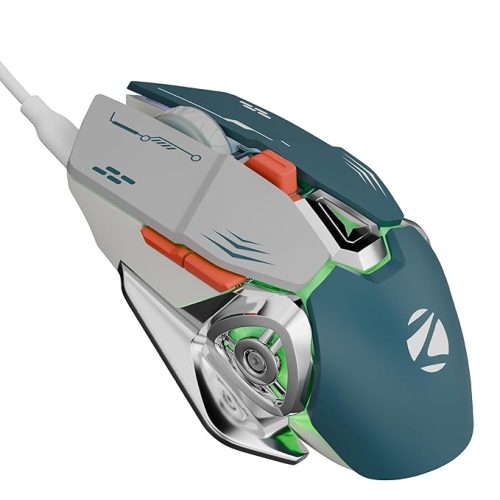
- Embrace the battle with Spectre: edgy design, 7-color rainbow lighting, and that breathing effect – all packed with electrifying energy!
EvoFox Starter Series Spectre USB Wired Gaming Mouse with Upto 3600 DPI Gaming Sensor | 6 Buttons Design | Upto 7 Million Clicks | 7 Colours Rainbow Lighting with Breathing Effect | 1.5m Braided Cable (Black)
Original price was: ₹799.00.₹379.00Current price is: ₹379.00.
Description
-
Best Mouse for Laptop – Precision and Comfort
Choosing the best mouse for laptop is crucial for productivity, gaming, and everyday tasks. Whether you’re a gamer, professional, or casual user, the right mouse ensures smooth navigation, precise control, and comfortable use for long hours.
Sleek and Ergonomic Design
The best mouse for laptop combines style and ergonomics:
-
Contoured shape fits naturally in your hand.
-
Supports extended use without causing fatigue.
-
Lightweight and portable for laptop users on the go.
Its design ensures that you can work or play comfortably for hours without discomfort.
High-Performance Gaming Sensor
A defining feature of the best mouse for laptop is its gaming-grade sensor:
-
Precise tracking for all movements.
-
Adjustable DPI levels: 1200, 1800, 2400, and 3600.
-
Ideal for gaming, graphic design, and precise editing tasks.
Adjustable DPI ensures versatility across different applications, providing accuracy and speed where it matters most.
Durable Build and Longevity
Durability is a hallmark of the best mouse for laptop:
-
Made with gaming-grade materials to withstand long-term use.
-
6 programmable buttons tested for over 7 million clicks.
-
Braided 1.5-meter cable enhances durability and prevents tangling.
The sturdy construction ensures long-lasting performance, making it a reliable companion for your laptop.
RGB Lighting for Style
The best mouse for laptop also features vibrant RGB lighting:
-
7-color rainbow lighting with breathing effect.
-
Customizable illumination enhances workspace aesthetics.
-
Creates an immersive gaming and working environment.
RGB lighting adds visual appeal while maintaining functionality for everyday use.
Plug-and-Play Connectivity
The best mouse for laptop offers seamless connectivity:
-
Connects via USB to most laptops and PCs.
-
EMI suppressor reduces noise in data transmission.
-
Hassle-free setup, ready to use instantly.
No complex installation is required, making it convenient for professionals and students alike.
Warranty and Customer Support
The best mouse for laptop comes with peace of mind:
-
1-year manufacturing warranty.
-
Easy support via call or WhatsApp for troubleshooting.
-
Reliable customer service ensures long-term satisfaction.
Warranty coverage ensures that your investment is protected against manufacturing defects.
Advantages of Using the Best Mouse for Laptop
-
Precision Tracking – High-performance sensor ensures accurate cursor movement.
-
Customizable DPI – Adjust sensitivity for gaming, design, or browsing.
-
Ergonomic Comfort – Reduces hand fatigue during extended use.
-
Durable Construction – Gaming-grade materials and long-lasting buttons.
-
Stylish RGB Lighting – Adds personality and aesthetics to your workspace.
Use Cases
Gaming
The best mouse for laptop is ideal for gamers:
-
High DPI ensures rapid response during gaming sessions.
-
Programmable buttons allow quick execution of commands.
-
RGB lighting enhances immersion during gameplay.
Professional Work
Perfect for professionals:
-
Smooth tracking for editing, designing, or office tasks.
-
Comfortable for long working hours.
-
Reliable connectivity for consistent performance.
Everyday Use
For casual users:
-
Ergonomic design ensures comfort for browsing, streaming, or social media.
-
Easy plug-and-play setup.
-
Compatible with a wide range of laptops and operating systems.
Best Mouse for Laptop – Advanced Features and Benefits
Finding the best mouse for laptop is no longer just about aesthetics. Today’s users demand high-performance devices that are versatile, durable, and comfortable. Whether you are gaming, working, or browsing, having a reliable mouse can dramatically improve productivity and enjoyment.
Ergonomic Design for Comfort
The best mouse for laptop ensures ergonomic comfort:
-
Contoured design fits naturally in your palm.
-
Reduces strain during extended hours of use.
-
Lightweight and portable, perfect for mobile professionals.
The ergonomics of the best mouse for laptop prevent hand fatigue, wrist strain, and discomfort, even for intensive tasks.
Precision Tracking with High DPI
Precision is critical when choosing the best mouse for laptop:
-
Adjustable DPI levels allow customization: 800, 1200, 1800, 2400, 3600.
-
Supports smooth, accurate tracking for professional applications like graphic design or CAD.
-
Offers responsive and reliable performance during gaming sessions.
High-DPI performance ensures precise cursor control and accurate movements for demanding tasks.
Durable Materials and Long Lifespan
The best mouse for laptop is built to last:
-
Constructed from high-quality, gaming-grade materials.
-
Buttons tested for over 7 million clicks.
-
Braided, tangle-resistant 1.5-meter cable.
Durability guarantees that your mouse remains functional and reliable over years of use, even in rigorous gaming or professional environments.
Customizable RGB Lighting
Add style to your setup with the best mouse for laptop:
-
7-color RGB lighting with breathing effects.
-
Customizable illumination to match your workspace or gaming rig.
-
Enhances aesthetics without affecting performance.
RGB lighting adds a professional yet stylish flair, making it both functional and visually appealing.
Multiple Programmable Buttons
The best mouse for laptop offers versatile functionality:
-
Six programmable buttons for quick shortcuts and macros.
-
Ideal for gaming, productivity, and software navigation.
-
Enhances workflow efficiency and reduces repetitive tasks.
Customizable buttons give you complete control over your applications and games.
Compatibility Across Devices
The best mouse for laptop is compatible with a variety of systems:
-
Works with Windows, macOS, and Linux laptops.
-
Supports plug-and-play USB connectivity.
-
No driver installation needed for basic use.
Compatibility ensures that you can use the mouse with multiple devices without additional setup hassles.
Wireless vs Wired Options
Choosing between wired and wireless models is essential for the best mouse for laptop:
-
Wired: Offers zero-latency response and uninterrupted power supply.
-
Wireless: Provides freedom of movement with Bluetooth or RF connection.
-
Rechargeable options reduce dependency on batteries.
Both wired and wireless models cater to different user preferences, ensuring flexibility.
Advanced Sensor Technology
High-quality optical or laser sensors make the best mouse for laptop accurate and responsive:
-
Optical sensors are perfect for smooth surfaces and office use.
-
Laser sensors provide high precision for gaming and graphic design.
-
Tracking speed and accuracy are critical for fast-paced tasks.
A high-precision sensor ensures smooth movement, accurate targeting, and efficient workflow.
Ergonomics for Different Grip Styles
The best mouse for laptop supports various grip styles:
-
Palm Grip: Provides full hand support and comfort.
-
Claw Grip: Offers control and rapid movement for gaming.
-
Fingertip Grip: Lightweight and precise for detailed tasks.
Multiple grip support ensures that every user can work comfortably according to their preference.
Noise Reduction and Smooth Clicks
Silent clicks are a feature of the best mouse for laptop:
-
Reduces noise for a quieter work environment.
-
Smooth and responsive click feel.
-
Suitable for office use and shared spaces.
Noise reduction enhances concentration and ensures a professional environment.
Battery Life and Power Management
For wireless models of the best mouse for laptop:
-
Long battery life ensures days or weeks of uninterrupted use.
-
Auto-sleep mode saves power when idle.
-
Rechargeable batteries minimize replacement costs.
Efficient power management is essential for uninterrupted productivity and gaming.
Warranty and Customer Support
The best mouse for laptop provides peace of mind:
-
1-year warranty against manufacturing defects.
-
Responsive customer service via call, email, or chat.
-
Replacement and repair options ensure long-term usability.
Reliable support ensures that any issues are resolved quickly without affecting work.
Why Invest in the Best Mouse for Laptop
-
Productivity Boost: Quick access to commands and shortcuts.
-
Enhanced Gaming Experience: Accurate and responsive for competitive gaming.
-
Ergonomic Comfort: Prevents fatigue and strain during long hours.
-
Durability: Lasts longer than standard mice with high-quality components.
-
Style: RGB lighting and sleek designs add aesthetic value.
Best Mouse for Laptop – Comprehensive Guide and Recommendations
Choosing the best mouse for laptop is crucial for both productivity and comfort. With the rise of remote work, gaming, and creative design, a reliable mouse enhances efficiency, accuracy, and ergonomics.
Ergonomic Comfort and Design
Ergonomics is a key factor for the best mouse for laptop. A well-designed mouse minimizes wrist strain and prevents repetitive stress injuries.
-
Contoured shapes fit naturally in the hand.
-
Smooth curves reduce pressure on palms during long usage.
-
Lightweight designs are perfect for mobile professionals and travelers.
A mouse with ergonomic features ensures comfort without sacrificing performance, making it ideal for prolonged work or gaming sessions.
Precision and DPI Control
For precision and responsiveness, DPI (dots per inch) is a defining metric for the best mouse for laptop:
-
Adjustable DPI settings from 800 to 3600 allow precise control.
-
High-DPI settings provide faster cursor movement for gaming.
-
Lower DPI ensures better accuracy for design, photo editing, or spreadsheets.
The ability to customize DPI settings lets users tailor the mouse to their workflow, improving both accuracy and speed.
Gaming-Grade Durability
The best mouse for laptop often uses high-grade materials and rigorous testing:
-
Buttons rated for over 7 million clicks.
-
High-quality plastics or metallic builds ensure long-lasting durability.
-
Braided cables reduce wear and tear for wired options.
Durability is critical for users who rely on their mouse daily, especially in high-intensity gaming or multitasking environments.
Connectivity Options
Choosing between wired and wireless connectivity affects performance and flexibility:
-
Wired USB: Provides zero-latency response, ideal for gaming or professional tasks.
-
Wireless RF/Bluetooth: Offers freedom of movement and reduces cable clutter.
-
Some models feature dual-mode connectivity for both wired and wireless use.
Reliable connectivity ensures uninterrupted work and a smooth user experience.
Multi-Device and Multi-Platform Compatibility
The best mouse for laptop is compatible with a wide range of devices:
-
Windows, macOS, and Linux support.
-
Plug-and-play functionality with USB ports.
-
Some models support multi-device switching between laptops, tablets, and desktops.
Cross-platform compatibility ensures you can use the same mouse across multiple devices without extra setup.
Advanced Sensor Technology
Optical and laser sensors improve precision for the best mouse for laptop:
-
Optical sensors excel on smooth surfaces and general office use.
-
Laser sensors provide accurate tracking on diverse surfaces and gaming needs.
-
Sensor technology ensures smooth pointer movement and responsiveness.
High-quality sensors enhance overall performance for design, work, or entertainment.
Programmable Buttons and Shortcuts
The best mouse for laptop offers customizable buttons:
-
Typically 5–6 programmable buttons for shortcuts and macros.
-
Assign functions like copy, paste, or gaming skills for quick access.
-
Reduces repetitive work, increasing efficiency in professional tasks.
Customizable buttons allow users to streamline tasks and improve workflow.
RGB Lighting and Aesthetic Appeal
Modern mice provide RGB lighting for the best mouse for laptop:
-
Multiple colors and breathing effects enhance visual appeal.
-
Customizable via software to match your workspace or gaming setup.
-
Adds style without affecting performance.
Stylish RGB lighting complements your laptop setup, making your workstation both functional and attractive.
Noise-Free Clicking
Silent or low-noise clicks are an advantage for the best mouse for laptop:
-
Reduces distraction in shared workspaces.
-
Smooth clicking mechanism ensures comfort.
-
Maintains a professional and quiet environment.
Noise-free operation is essential for office or study environments.
Battery Life and Power Management
For wireless models of the best mouse for laptop:
-
Long battery life ensures days or weeks of use.
-
Auto-sleep features save power when idle.
-
Rechargeable models reduce the need for disposable batteries.
Efficient power management provides uninterrupted usage and reduces operational costs.
Reviews of Top Best Mouse for Laptop Models
1. Spectre RGB Gaming Mouse
-
7-color RGB lighting.
-
Adjustable DPI: 1200–3600.
-
6 programmable buttons.
-
1.5-meter braided cable.
2. Logitech MX Master Series
-
Ergonomic design for extended use.
-
Multi-device support with cross-platform compatibility.
-
High-precision sensor with 4000 DPI.
3. Redragon M711 Cobra
-
6 customizable buttons with macro support.
-
RGB lighting with software control.
-
Durable metal scroll wheel.
These models provide options for gamers, professionals, and general users seeking the best mouse for laptop.
Choosing the Right Mouse
Factors to consider when selecting the best mouse for laptop:
-
Purpose: Gaming, work, or general use.
-
Ergonomics: Hand size, grip style, and comfort.
-
DPI and precision: Matching speed and accuracy needs.
-
Durability: Long-lasting materials and button lifespan.
-
Connectivity: Wired vs wireless preferences.
Making an informed choice ensures the mouse meets your productivity and performance requirements.
Benefits of the Best Mouse for Laptop
-
Improved Productivity: Shortcuts, macros, and programmable buttons.
-
Enhanced Gaming Experience: Accurate tracking and fast response times.
-
Comfortable Ergonomics: Reduced wrist and hand strain.
-
Durable Build: Reliable for years of use.
-
Stylish Design: Aesthetic RGB and modern finishes.
Investing in the best mouse for laptop improves both professional output and personal computing experience.
Best Mouse for Laptop – Advanced Guide and Top Picks
Selecting the best mouse for laptop is essential for both productivity and comfort. Whether for professional use, gaming, or casual computing, a high-quality mouse enhances efficiency, precision, and ergonomics.
Ergonomic Designs for Long-Term Use
A key factor in choosing the best mouse for laptop is ergonomics:
-
Contoured shapes fit naturally in your hand.
-
Smooth curves reduce wrist strain during prolonged usage.
-
Lightweight designs are ideal for travel or portable setups.
An ergonomic mouse reduces fatigue and risk of repetitive strain injuries, ensuring long-term comfort.
Wireless Connectivity Options
Wireless mice provide flexibility and convenience for the best mouse for laptop:
-
Bluetooth connectivity for seamless pairing with laptops, tablets, and desktops.
-
RF wireless with USB dongle for reliable connection.
-
Dual-mode options allow switching between wired and wireless use.
Wireless mice reduce cable clutter and increase mobility, making them perfect for mobile professionals.
Gaming-Ready Performance
For gamers, the best mouse for laptop delivers high precision and fast response times:
-
Adjustable DPI up to 16,000 for accurate cursor movement.
-
High polling rate ensures minimal latency.
-
Durable buttons rated for millions of clicks withstand intense gaming sessions.
Gaming mice combine performance with aesthetics, often featuring RGB lighting and customizable macros.
Multi-Device and Multi-Platform Compatibility
The best mouse for laptop should support multiple devices and platforms:
-
Works on Windows, macOS, Linux, and ChromeOS.
-
Supports multi-device switching for laptops, tablets, and desktops.
-
Some models allow pairing with multiple devices simultaneously.
Cross-platform compatibility ensures seamless use across your workflow without extra adapters.
Programmable Buttons and Shortcuts
Customization is key for productivity:
-
5–8 programmable buttons for shortcuts, macros, and media control.
-
Assign frequently used commands for quick access.
-
Enhances efficiency for office tasks, graphic design, or gaming.
Programmable buttons streamline repetitive tasks, saving time and effort.
Advanced Sensor Technology
High-performance sensors make the best mouse for laptop highly responsive:
-
Optical sensors excel on standard surfaces with smooth tracking.
-
Laser sensors provide precision on glossy or uneven surfaces.
-
High-resolution sensors allow precise control for design and gaming.
Accurate sensors improve workflow efficiency and gaming performance.
Battery Life and Charging
For wireless models of the best mouse for laptop:
-
Rechargeable lithium-ion batteries offer long usage hours.
-
Auto-sleep mode conserves power when idle.
-
USB-C or micro-USB ports enable quick recharging.
Efficient battery life ensures uninterrupted performance during work or gaming.
Silent Clicking and Noise Reduction
A quiet mouse is essential for shared workspaces:
-
Silent click mechanisms reduce distractions.
-
Smooth scroll wheels ensure noise-free operation.
-
Perfect for office, library, or study environments.
Silent operation allows you to focus while maintaining professional etiquette.
RGB Lighting and Customization
Modern mice often include RGB lighting for aesthetics:
-
Customizable color schemes enhance your workspace or gaming setup.
-
Effects such as breathing, color cycling, and reactive lighting.
-
Can be controlled via proprietary software for personalization.
RGB lighting combines style with functionality, elevating the visual appeal of your setup.
Durability and Build Quality
Durability is crucial for the best mouse for laptop:
-
High-quality plastics or aluminum chassis ensure long-term usage.
-
Buttons tested for millions of clicks withstand heavy use.
-
Braided cables prevent fraying for wired models.
Reliable build quality ensures your mouse remains functional even under intense daily use.
Top Picks for Best Mouse for Laptop
1. Logitech MX Master 3
-
Ergonomic design, customizable buttons.
-
Multi-device connectivity.
-
High-precision sensor (4000 DPI).
2. Razer DeathAdder V2
-
Gaming-grade mouse with 20,000 DPI optical sensor.
-
Programmable buttons and RGB lighting.
-
Durable mechanical switches.
3. HP X4000b Bluetooth Mouse
-
Wireless Bluetooth connectivity.
-
Comfortable ergonomic design.
-
Long battery life with reliable performance.
4. Redragon M711 Cobra
-
Adjustable DPI (800–10,000).
-
RGB lighting and programmable buttons.
-
Ergonomic design with anti-slip grip.
Choosing the Right Mouse
When selecting the best mouse for laptop, consider:
-
Purpose: Office, gaming, or casual use.
-
Comfort: Ergonomic shape for long-term use.
-
Performance: DPI settings, sensor type, and response time.
-
Durability: Material quality and click lifespan.
-
Connectivity: Wired or wireless based on mobility needs.
A suitable choice balances comfort, performance, and reliability for your workflow.
Benefits of the Best Mouse for Laptop
-
Enhanced Productivity: Programmable buttons and shortcuts streamline tasks.
-
Comfortable Usage: Ergonomic design reduces strain.
-
High Precision: Adjustable DPI and advanced sensors improve accuracy.
-
Durability: Long-lasting materials and robust build.
-
Stylish Design: RGB lighting and modern aesthetics.
Investing in the best mouse for laptop ensures efficiency, reliability, and comfort across all applications.
-
-
-

Reviews
There are no reviews yet.