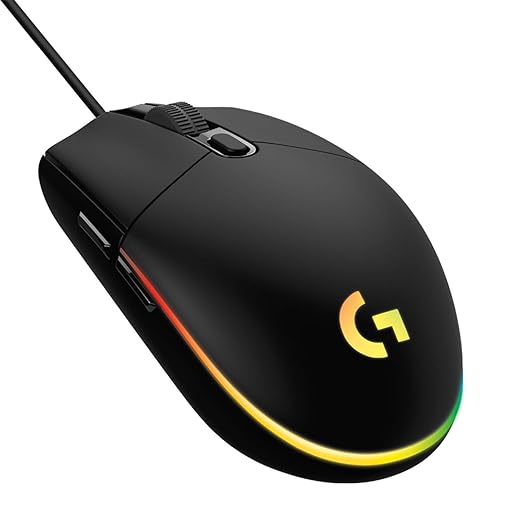
- COLORFUL LIGHTSYNC RGB : Play in colour with our most vibrant LIGHTSYNC RGB featuring colour wave effects that are customisable across 16.8 million colours. 8,000 DPI sensor.
Logitech G102 USB Light Sync Gaming Mouse with Customizable RGB Lighting, 6 Programmable Buttons, Gaming Grade Sensor, 8K DPI Tracking, 16.8mn Color, Light Weight – Black
Original price was: ₹2,295.00.₹1,295.00Current price is: ₹1,295.00.
Description
-
Logitech Computer Mouse – Precision, Style, and Performance
A Logitech computer mouse is a perfect blend of precision, ergonomic design, and cutting-edge technology. From gamers to professionals, Logitech offers mice that meet every need.
Key Features
Colorful LIGHTSYNC RGB
The Logitech computer mouse features vibrant LIGHTSYNC RGB technology with customizable color wave effects. Users can choose from 16.8 million colors, creating a visually engaging experience. Perfect for gaming setups or professional workspaces, the RGB lighting can be synchronized with games or apps for immersive feedback.
Gamer-Tested Design
This Logitech computer mouse has a classic 6-button layout, offering comfort and total control. The design is gamer-tested, ensuring long-lasting comfort during extended sessions. The ergonomics suit both right- and left-handed users, making it versatile.
Mechanical Spring Button Tensioning
Durability meets performance with mechanical spring tensioning. Primary buttons on the Logitech computer mouse are equipped with metal springs for consistent, tactile feedback. This ensures each click is precise, reliable, and perfect for competitive gaming or high-efficiency work tasks.
Customizable DPI Settings
Adjust the Logitech computer mouse sensitivity easily using Logitech G HUB software. You can cycle through up to five DPI settings, ranging from low sensitivity for precise tasks to high sensitivity for fast action in gaming. The software allows profiles for different applications and games.
Performance and Ergonomics
Accurate Tracking
Equipped with an 8,000 DPI sensor, the Logitech computer mouse offers precise tracking for gaming, design, or office work. Whether you’re handling spreadsheets, designing graphics, or playing fast-paced games, the sensor ensures smooth cursor movement.
Comfortable Grip
The shape and size of the Logitech computer mouse provide a natural grip for various hand sizes. Soft-touch materials and contoured sides reduce strain, allowing for long hours of use without fatigue.
Customizable Buttons
Beyond the standard 6-button layout, users can program additional functions via Logitech software. Assign macros, shortcuts, or multimedia controls to enhance productivity or gaming efficiency.
Connectivity and Compatibility
-
USB Plug-and-Play: Connect your Logitech computer mouse easily to any computer.
-
Software Optional: While basic functionality works out of the box, Logitech G HUB allows advanced customization.
-
Cross-Platform Compatibility: Compatible with Windows 7 or later, macOS 10.11 or later, and Chrome OS.
This ensures your Logitech computer mouse works seamlessly across different devices and operating systems.
RGB Customization
The LIGHTSYNC RGB on the Logitech computer mouse isn’t just for looks. Synchronize lighting with in-game events, notifications, or music for a dynamic experience. The customization adds both functional and aesthetic value to your setup.
Durability and Build Quality
Logitech’s attention to detail makes this Logitech computer mouse a reliable tool for daily use. The metal spring tensioning, premium plastics, and high-quality sensor make it durable for years of intensive use.
Practical Applications
Gaming
The Logitech computer mouse is ideal for FPS, MOBA, and RTS games due to its fast response, programmable buttons, and high DPI range. RGB lighting adds visual cues for game events.
Office Use
For professionals, the Logitech computer mouse offers accurate tracking, customizable buttons, and ergonomic comfort for long working hours.
Creative Work
Designers and content creators benefit from smooth tracking, DPI customization, and programmable macros, improving workflow efficiency.
Software Features
Logitech G HUB allows:
-
DPI adjustments up to 8000 DPI
-
RGB customization
-
Button remapping and macros
-
Profile management for different games or software
This software ensures that your Logitech computer mouse can adapt to every user’s needs.
Maintenance Tips
-
Clean the sensor and mouse feet regularly to maintain smooth tracking.
-
Avoid eating or drinking near the Logitech computer mouse to prevent accidental spills.
-
Check the USB cable for wear and tear; braided cables last longer.
-
Update Logitech G HUB software to ensure compatibility with new games and applications.
Why Choose Logitech
-
Proven reliability and performance
-
Ergonomic and gamer-tested designs
-
Advanced sensors and programmable features
-
Vibrant RGB customization
A Logitech computer mouse is ideal for users seeking a mix of precision, aesthetics, and long-lasting durability.
FAQs
Q1: Is this mouse suitable for both Windows and Mac?
Yes, it supports Windows 7 or later and macOS 10.11 or later.Q2: Can I customize the DPI?
Absolutely, you can cycle through five DPI settings with Logitech G HUB software.Q3: How durable is the mouse?
With mechanical spring tensioning and quality materials, it is designed for long-lasting performance.Q4: Can RGB lighting be turned off?
Yes, the lighting is fully customizable and can be turned off if preferred.Q5: Does it require software to function?
No, basic functions work via plug-and-play, but Logitech G HUB unlocks advanced customization.Logitech Computer Mouse – Advanced Features and Gaming Insights
The Logitech computer mouse isn’t just a peripheral; it’s a precision tool that elevates your gaming and productivity experience. From ergonomic designs to high-end sensors, Logitech ensures every mouse is tailored for superior performance.
Advanced Gaming Features
High DPI Performance
The Logitech computer mouse features an 8,000 DPI sensor, offering precise control for fast-paced gaming. Gamers can adjust DPI in real-time to match in-game situations. Lower DPI provides accuracy for sniping or detailed work, while higher DPI allows faster movements during intense battles.
Programmable Buttons for Macros
Customize your Logitech computer mouse buttons with Logitech G HUB software. Assign macros, shortcuts, or multimedia functions to maximize efficiency. This feature is particularly useful for MMORPG, MOBA, and FPS gamers, giving them an edge in competitive scenarios.
Ultra-Fast Response Times
Equipped with a 1000Hz polling rate, the Logitech computer mouse ensures that every click and movement is registered instantly. This ultra-fast response is essential for gaming and tasks that require precision.
Ergonomics and Comfort
Contoured Design
The Logitech computer mouse is designed to fit naturally in your hand. Contoured sides, textured grips, and a comfortable palm rest reduce strain during long gaming or work sessions.
Lightweight Build
Despite its robust features, the Logitech computer mouse is lightweight, allowing effortless gliding across mouse pads. The smooth UPE feet provide minimal friction for fast and accurate movements.
Left- and Right-Handed Use
Many Logitech mice support ambidextrous use. The Logitech computer mouse accommodates both left- and right-handed users with comfortably placed buttons and symmetrical designs.
RGB Customization
LIGHTSYNC RGB
The LIGHTSYNC RGB lighting on the Logitech computer mouse is customizable across 16.8 million colors. Synchronize lighting with games, apps, or audio for a fully immersive experience.
Adaptive Lighting
Your Logitech computer mouse can change colors based on in-game events. For example, health levels, ammo count, or cooldowns can be visually represented with RGB lighting for a dynamic gaming experience.
Software Control
Logitech G HUB allows precise control over RGB, including effects like color wave, breathing, or static colors. Save multiple profiles to switch between work, gaming, or streaming setups easily.
Durability and Build Quality
Mechanical Spring Tensioning
Primary buttons on the Logitech computer mouse are equipped with mechanical springs. This ensures consistent feedback and reliability for millions of clicks.
Premium Materials
High-quality plastics, metal springs, and braided cables make the Logitech computer mouse durable for long-term use. The mouse is built to withstand extended gaming sessions and daily office work.
Long-Lasting Performance
With robust internal components and reliable sensors, the Logitech computer mouse maintains performance over years of use, giving gamers and professionals peace of mind.
Connectivity and Compatibility
Plug-and-Play USB
The Logitech computer mouse works instantly with any computer via USB connection. No drivers are required for basic functionality.
Logitech G HUB Software
For advanced customization, Logitech G HUB software allows DPI adjustment, RGB control, button mapping, and profile management.
Cross-Platform Support
Compatible with Windows 7 or later, macOS 10.11 or later, and Chrome OS. This ensures your Logitech computer mouse works seamlessly across multiple devices.
Productivity Use
Office Applications
The Logitech mouse enhances workflow efficiency. Customize buttons for shortcuts, application switching, or spreadsheet navigation.
Creative Tools
For designers and content creators, the mouse offers smooth tracking and precise control. DPI customization ensures accuracy for graphics work, photo editing, or video editing tasks.
Multi-Tasking
Assign macros for repetitive actions, making the Logitech mouse an essential productivity tool for professionals juggling multiple applications simultaneously.
Safety and Maintenance
Cleaning and Care
Regularly clean the sensor and mouse feet to maintain smooth tracking. Avoid spills and keep the mouse away from dust and debris.
Cable Management
Use the included braided cable to reduce tangling and enhance durability. Inspect cables periodically for wear.
Software Updates
Keep Logitech G HUB updated to ensure compatibility with new games, applications, and operating systems.
Comparing Logitech Computer Mouse with Competitors
Versus Razer
Logitech offers longer-lasting performance and robust software features, often at a better price point than Razer mice. RGB customization is comparable, but Logitech provides better ergonomics for extended use.
Versus Corsair
While Corsair mice excel in high-end gaming, the Logitech mouse offers versatile use for both gaming and productivity. Its lightweight design and mechanical spring buttons provide a distinct advantage in long sessions.
Versus HP and Dell
Compared to standard office mice from HP or Dell, the Logitech mouse provides advanced tracking, programmable buttons, and RGB customization, making it ideal for gamers and professionals alike.
User Testimonials
-
“The Logitech computer mouse transformed my gaming setup. The DPI adjustment and RGB lighting are perfect.”
-
“I use it for work and gaming. Comfortable grip and programmable buttons make my workflow so much easier.”
-
“Durable, precise, and stylish. I’ve tried multiple brands, but Logitech is unbeatable for daily use and gaming.”
Tips for Maximizing Logitech Mouse Performance
-
Use a high-quality mouse pad to enhance sensor accuracy.
-
Update firmware regularly through Logitech G HUB.
-
Customize RGB lighting profiles for different applications.
-
Assign frequently used commands to programmable buttons.
-
Adjust DPI based on your activity: low for design work, high for gaming.
Logitech Computer Mouse – Advanced Features, Setup, and Usage
The Logitech computer mouse continues to be a top choice for both gamers and professionals. Its combination of precision, durability, and customization makes it versatile for multiple use cases.
Advanced Sensor Technology
Optical vs Laser
Most Logitech computer mouse models use high-precision optical sensors. Optical sensors provide accurate tracking on a variety of surfaces. Laser sensors are available in select high-end models, offering even higher sensitivity. Both ensure pixel-perfect accuracy in gaming or creative tasks.
Adjustable DPI Settings
With adjustable DPI from 200 up to 8,000 or more, the Logitech computer mouse allows you to switch between low and high sensitivity. Low DPI provides steady control for photo editing or spreadsheet work. High DPI ensures rapid response for fast-paced gaming.
High Polling Rate
The mouse’s 1000Hz polling rate ensures the computer registers movements instantly. This feature makes the Logitech computer mouse ideal for competitive gaming where every millisecond counts.
Ergonomic Advantages
Long-Term Comfort
The Logitech computer mouse is designed for extended use. Ergonomic curves, textured grips, and thumb rests reduce strain during long gaming or work sessions. Users report less fatigue compared to standard mice.
Ambidextrous Options
Several Logitech mice support both left- and right-handed users. The ambidextrous design makes the Logitech computer mouse versatile in shared workspaces or multi-user gaming setups.
Lightweight and Balanced
Despite advanced features, the Logitech computer mouse maintains a lightweight design. Balanced weight distribution allows smooth gliding and prevents wrist fatigue.
Customization and Software
Logitech G HUB Software
The Logitech computer mouse works seamlessly with Logitech G HUB. Users can customize button mapping, RGB lighting, DPI settings, and create multiple profiles for different games or work scenarios.
Macros and Productivity Shortcuts
Assign macros to programmable buttons for repetitive tasks in games, office work, or creative applications. The Logitech computer mouse enhances productivity by reducing keystrokes and streamlining workflows.
RGB Lighting Effects
LIGHTSYNC RGB on the Logitech computer mouse allows full color customization. Sync lighting with in-game events, music, or other Logitech devices for a cohesive setup.
Durability and Build Quality
Mechanical Spring Tensioning
Primary buttons feature mechanical springs, ensuring consistent clicks for millions of operations. This makes the Logitech computer mouse highly durable and reliable.
Premium Materials
Constructed with high-quality plastics, braided cables, and metal components, the Logitech computer mouse withstands heavy use and travel.
Long-Term Reliability
Gamers and professionals report consistent performance over years, highlighting the mouse’s quality and durability.
Gaming Features
Precision Tracking
The Logitech computer mouse provides precise tracking for FPS, MOBA, and MMORPG games. Adjustable DPI and polling rates allow users to tailor sensitivity to their play style.
Customizable Buttons
Program the 6–12 buttons on select models to execute in-game actions, launch applications, or perform repetitive tasks. This feature enhances gameplay efficiency and reaction time.
RGB Synchronization
Dynamic RGB lighting adds an immersive experience to gaming. Sync your Logitech computer mouse with other Logitech devices or in-game events to create a visually stunning environment.
Productivity and Office Use
Multi-Application Efficiency
Use programmable buttons to switch between applications, copy-paste content, or execute shortcuts. The Logitech computer mouse boosts workflow efficiency across multiple platforms.
Creative Work
For designers and editors, the mouse allows fine control over graphics, photo, or video editing software. Adjustable DPI ensures precision for detailed work.
Cross-Platform Support
Compatible with Windows, macOS, and Chrome OS, the Logitech computer mouse functions seamlessly across devices, making it a versatile tool for any office or home setup.
Maintenance Tips
Cleaning
Regularly clean the mouse sensor and feet to maintain smooth movement. Avoid liquids or excessive dust accumulation.
Cable Management
Use the braided cable for durability. Check for wear and tear to maintain optimal performance.
Software Updates
Keep Logitech G HUB updated for new features, bug fixes, and compatibility improvements.
Comparisons with Other Brands
Razer vs Logitech
While Razer mice offer similar high-end sensors, the Logitech computer mouse provides more ergonomic designs and longer-lasting performance at competitive prices.
Corsair vs Logitech
Corsair focuses on gaming performance; however, Logitech balances gaming and office productivity. Its programmable buttons and software versatility make it suitable for multi-purpose use.
HP/Dell vs Logitech
Standard office mice lack advanced sensors and customization. The Logitech computer mouse outperforms these in tracking precision, programmable buttons, and RGB customization.
User Reviews
-
“Switching to Logitech transformed my gaming setup. DPI adjustment and RGB customization are perfect.”
-
“Comfortable for work and gaming. The programmable buttons save me a lot of time.”
-
“Durable, precise, and stylish. Logitech’s mouse is worth every penny for long-term use.”
Expert Tips
-
Always use a smooth mouse pad for optimal sensor performance.
-
Customize DPI for specific tasks: low for editing, high for gaming.
-
Assign macros to repetitive tasks for increased efficiency.
-
Sync RGB lighting with other Logitech devices for a unified setup.
-
Regularly update Logitech G HUB for latest features.
Conclusion
The Logitech computer mouse combines precision, durability, and customization. Whether for gaming, creative work, or office productivity, it delivers consistent performance. Its ergonomic design, programmable buttons, and RGB features make it suitable for extended use, while the robust build ensures long-term reliability.
Logitech Computer Mouse – Compact Summary
The Logitech computer mouse delivers precision, comfort, and versatility for work and gaming.
Key Features
-
High-Precision Sensor: Smooth tracking for gaming and creative tasks.
-
Adjustable DPI: Switch between 200–8000 DPI for precise control.
-
Ergonomic Design: Comfortable for long sessions, reduces wrist strain.
-
Customizable Buttons: Program macros or shortcuts for efficiency.
-
RGB Lighting: LIGHTSYNC RGB offers 16.8M colors, synced with games or apps.
-
Durable Build: Mechanical spring buttons and high-quality materials ensure longevity.
Usage Tips
-
Pair with Logitech G HUB software for full customization.
-
Use on a smooth surface for optimal tracking.
-
Update firmware for best performance.
Compatibility
-
Works with Windows, macOS, Chrome OS, and most desktops or laptops.
Why Choose Logitech
The Logitech computer mouse combines professional-grade features with durability. Perfect for gamers, designers, and office users. It provides smooth tracking, comfortable ergonomics, and programmable buttons for increased productivity.
-
-



Reviews
There are no reviews yet.