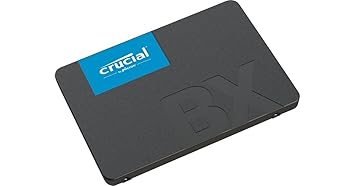
Boost laptop speed with the Crucial BX500 500GB external solid state drive, featuring 550MB/s read, 500MB/s write, 3D NAND durability, and a 3-year warranty.
Crucial BX500 500GB External Solid State Drive – Ultra Fast
Original price was: ₹5,599.00.₹3,423.00Current price is: ₹3,423.00.
Description
External Solid State Drives
Introduction to External Solid State Drives
An external solid state drive (SSD) is one of the most efficient, durable, and portable storage devices available today. Unlike traditional hard disk drives (HDDs), SSDs use flash memory technology, ensuring faster read and write speeds, improved durability, and consistent performance. For gamers, designers, and professionals handling large files, an external SSD is no longer a luxury but a necessity.
The Crucial BX500 500GB external solid state drive is a reliable option in this category, combining high-speed performance with advanced 3D NAND technology. It not only offers faster data transfer but also long-term endurance and portability, making it perfect for everyday users and professionals alike.
Why Choose an External Solid State Drive?
1. Blazing Fast Performance
One of the primary reasons people upgrade from an HDD to an external SSD is speed. With sequential read speeds up to 550MB/s and write speeds up to 500MB/s, the Crucial BX500 delivers up to 3X faster performance compared to traditional hard drives.
-
Faster boot times for operating systems
-
Quicker file transfers for large videos or design projects
-
Smooth performance when handling heavy workloads
2. Portability and Convenience
Unlike bulky HDDs, an external solid state drive is compact, lightweight, and easy to carry. Whether you’re working from home, traveling, or gaming on the go, the Crucial BX500 allows you to take your data with you securely.
-
Pocket-sized design for portability
-
No moving parts, ensuring resistance to shocks and drops
-
Simple plug-and-play setup for laptops, desktops, or consoles
3. Durability and Endurance
The Crucial BX500 comes with a 120TBW (Terabytes Written) endurance rating, ensuring it can handle years of heavy use. It is equipped with thermal monitoring and data integrity algorithms, which protect files even under demanding workloads.
-
Enhanced endurance for long-term reliability
-
Data protection against corruption
-
Thermal control for stable performance
Key Features of Crucial BX500 External Solid State Drive
1. 3D NAND Technology
The use of 3D NAND flash memory allows Crucial BX500 to deliver consistent performance, efficiency, and durability. This advanced technology stacks memory cells vertically, enabling more storage in smaller spaces.
-
Higher density storage
-
Better energy efficiency
-
Longer lifespan
2. Wide Operating Range
The drive is built to work under a wide temperature range, from 0°C to 70°C. Whether you’re working in a warm environment or moving between different setups, the Crucial BX500 maintains stability.
3. Endurance-Ready Protection
With built-in data integrity algorithms and thermal monitoring, this external solid state drive ensures that your data is safe from corruption or overheating issues.
4. Compatibility
The Crucial BX500 is compatible with multiple devices:
-
Laptops (Windows, macOS, Linux)
-
Desktops and gaming rigs
-
External SSD setups for backups and storage
-
Gaming consoles for faster load times
Benefits of Using Crucial BX500 500GB External SSD
1. Ultra-Fast Storage
With speeds far beyond HDDs, you get lightning-fast boot times, rapid application launches, and smooth file transfers.
2. Reliable for Professionals
For designers, video editors, and gamers, speed and durability are critical. The Crucial BX500 ensures smooth workflows even with large files.
3. Portability for Daily Use
Whether at home, office, or outdoors, this external solid state drive is easy to carry and ensures data is always accessible.
4. Enhanced Security and Reliability
Thermal protection, endurance rating, and 3-year warranty provide peace of mind for long-term use.
Amazon/Flipkart Highlights
-
500GB external solid state drive – high-speed storage for laptops & desktops
-
Sequential read up to 550MB/s, write up to 500MB/s – up to 3X faster than HDDs
-
Durable 3D NAND technology – reliable under heavy workloads
-
Endurance-ready 120TBW – thermal monitoring & data integrity protection
-
Wide compatibility – laptops, desktops, and external SSD setups
-
Operating range 0°C–70°C – stable even in harsh environments
-
3-year limited warranty – proven SSD reliability
External Solid State Drive vs Traditional HDD
Many users often wonder why they should spend more on an external solid state drive when traditional hard disk drives are cheaper. Let’s compare them in key areas:
1. Speed
-
HDDs usually offer speeds of 80–160 MB/s.
-
The Crucial BX500 external solid state drive reaches 550MB/s read and 500MB/s write.
-
For gamers and video editors, the difference is night and day.
2. Durability
-
HDDs have moving parts, making them prone to damage from drops.
-
SSDs have no moving parts, making them resistant to shocks, vibrations, and accidental bumps.
3. Portability
-
HDDs are bulkier, heavier, and less travel-friendly.
-
The Crucial BX500 external SSD is compact and pocket-sized.
4. Lifespan
-
HDDs tend to fail earlier due to mechanical wear.
-
An external solid state drive like the BX500 has a 120TBW endurance rating and advanced thermal monitoring.
5. Cost
-
HDDs are cheaper per gigabyte.
-
SSDs are costlier but offer far superior performance and reliability.
Verdict: If you prioritize speed, durability, and portability, the Crucial BX500 external solid state drive is the better choice.
Comparing Crucial BX500 with Other Popular External Solid State Drives
1. Crucial BX500 vs Samsung T7
-
Samsung T7 has higher capacity options (up to 2TB).
-
Crucial BX500 offers excellent balance at 500GB for budget users.
-
Both provide strong read/write speeds, but BX500 delivers a cost-effective solution.
2. Crucial BX500 vs WD My Passport SSD
-
WD offers stylish design and shock resistance.
-
Crucial BX500 focuses on affordability with reliable 3D NAND technology.
-
Both are highly portable, but Crucial has stronger value for price.
3. Crucial BX500 vs Kingston XS2000
-
Kingston XS2000 supports USB 3.2 Gen 2×2 with extreme transfer speeds.
-
Crucial BX500 is designed for everyday users, gamers, and designers at a fraction of the price.
Summary: If you’re looking for balance between performance, durability, and affordability, the Crucial BX500 external solid state drive is one of the most reliable options in its class.
Use Cases of External Solid State Drives
1. For Gamers
Gamers need lightning-fast load times and smooth performance. An external solid state drive like Crucial BX500 ensures:
-
Faster game loading compared to HDDs
-
Reduced lag during gameplay
-
Reliable backup for large game libraries
Example: A 50GB game installs in a fraction of the time compared to HDD.
2. For Designers and Video Editors
Editing 4K videos, rendering animations, and handling large Photoshop files require strong performance. With the BX500:
-
File transfers are seamless
-
Projects save instantly
-
Rendering workflows are faster
3. For Professionals
Business users and freelancers rely on secure data. An external solid state drive ensures:
-
Safe backup for critical documents
-
Portable storage for presentations
-
Faster boot speeds for secondary OS installations
4. For Everyday Users
Even for casual users, having a reliable SSD offers:
-
Quick file storage for photos and music
-
Easy portability during travel
-
Stable backup solution
Advantages of Crucial BX500 500GB External SSD
-
Fast performance – 550MB/s read & 500MB/s write
-
Durable design – no moving parts, shock resistant
-
120TBW endurance – long-lasting performance
-
Thermal monitoring – prevents overheating
-
3D NAND technology – efficient and reliable
-
Portable size – fits easily in pockets
-
Compatible – works with laptops, desktops, and consoles
-
Warranty – 3-year brand support
Limitations of External Solid State Drives
While SSDs like Crucial BX500 are excellent, it’s important to know their limitations:
-
Higher cost per GB compared to HDDs
-
Lower storage capacities available at budget levels (500GB or 1TB max affordable)
-
Limited lifespan if constantly used for extremely heavy workloads (though 120TBW covers years of use)
Still, for performance, these drawbacks are minimal.
Buying Guide – How to Choose the Right External Solid State Drive
When buying an external solid state drive, keep these factors in mind:
1. Storage Capacity
-
500GB – Best for casual users, gamers, and professionals with moderate needs
-
1TB – Ideal for designers and editors
-
2TB+ – Suited for advanced users with massive data
2. Read/Write Speed
Always look for drives with 500MB/s+ speeds for smooth transfers. The Crucial BX500 is a solid option here.
3. Endurance Rating (TBW)
The higher the TBW, the longer your external SSD will last. Crucial BX500 provides 120TBW, which is excellent for its class.
4. Compatibility
Check if it supports your device – laptops, desktops, gaming consoles, or even external setups.
5. Portability
Look for a lightweight, compact design if you travel frequently.
6. Warranty
At least 3 years warranty ensures peace of mind. Crucial BX500 includes this by default.
Tips to Extend the Life of Your External Solid State Drive
-
Avoid unnecessary writes – Don’t keep rewriting the same data.
-
Keep it cool – Don’t expose it to extreme heat.
-
Safely eject the SSD – Prevent corruption by always ejecting before removal.
-
Use it for critical storage – Store important data, OS, or games.
-
Update firmware – Occasionally update to keep performance optimized.
Real-Life Examples
-
A gamer loads a 50GB open-world game in under 40 seconds with Crucial BX500, while HDD takes over 2 minutes.
-
A video editor transfers a 10GB 4K project in under 30 seconds, saving hours weekly.
-
A professional carries confidential data securely with an SSD that’s durable against shocks and drops.
Warranty and Support
The Crucial BX500 comes with:
-
3-year limited warranty
-
Reliable after-sales support
-
Brand assurance from Crucial, a trusted memory and storage brand
Users can easily claim warranty by providing the invoice at authorized service centers.
Frequently Asked Questions (FAQs) about External Solid State Drives
1. What is an external solid state drive?
An external solid state drive is a portable storage device that uses flash memory instead of mechanical disks. It connects to your laptop, desktop, or gaming console via USB or Type-C, offering lightning-fast data transfer speeds and durability.
2. Why is an external solid state drive faster than an HDD?
Unlike HDDs that use spinning platters, SSDs rely on NAND flash technology. This allows them to read and write data instantly. The Crucial BX500, for instance, offers 550MB/s read and 500MB/s write, making it nearly three times faster than HDDs.
3. Can I use an external solid state drive for gaming consoles?
Yes. Many gamers use SSDs with PlayStation, Xbox, or even handheld devices to reduce game loading times. A 500GB Crucial BX500 can hold multiple AAA titles and ensure smooth performance.
4. Are external solid state drives safe for long-term storage?
Yes, they are more reliable than HDDs due to the absence of moving parts. However, like any electronic device, it’s best to back up data regularly. The 120TBW endurance on Crucial BX500 ensures long-lasting storage.
5. Do external SSDs work with Mac and Windows?
Absolutely. An external solid state drive like Crucial BX500 is compatible with both MacOS and Windows systems. Some may require formatting before first use, but after setup, they work seamlessly.
6. Can I install an operating system on an external SSD?
Yes. Professionals often install Linux, Windows, or even macOS boot drives on external SSDs. This allows you to carry a fully bootable system in your pocket.
7. How long does an external SSD last?
With proper use, an external solid state drive can last 7–10 years or more. Crucial’s TBW (terabytes written) endurance rating guarantees extended life for average users.
Common Myths about External Solid State Drives
Myth 1: SSDs don’t last long
Truth: Early SSDs had lower durability. Modern drives like the Crucial BX500 with 3D NAND and 120TBW endurance last longer than many HDDs.
Myth 2: External SSDs are too expensive
Truth: Prices have dropped significantly. A 500GB external solid state drive is now affordable for everyday users.
Myth 3: HDDs are better for gaming
Truth: While HDDs offer large storage at a lower cost, external SSDs provide faster loading, smoother gameplay, and better reliability.
Myth 4: SSDs lose data easily
Truth: SSDs are actually more resistant to shocks, drops, and power failures compared to HDDs. With thermal monitoring and data integrity checks, Crucial BX500 keeps your files safe.
Myth 5: All SSDs are the same
Truth: Performance varies based on NAND type, interface (SATA, NVMe), and endurance ratings. Crucial BX500 balances performance and price for mainstream users.
Troubleshooting Common Issues with External Solid State Drives
Even though SSDs are reliable, users may face some issues. Here’s how to fix them:
1. Drive Not Detected
-
Check USB/Type-C cable and port.
-
Try connecting to another device.
-
Initialize the drive in Disk Management (Windows) or Disk Utility (Mac).
2. Slow Performance
-
Ensure the port supports USB 3.0 or higher.
-
Update firmware.
-
Avoid filling the drive completely; keep 10–15% free space.
3. Overheating
-
Place the SSD in a well-ventilated space.
-
Avoid long continuous heavy transfers.
-
Crucial BX500 includes thermal monitoring to prevent overheating.
4. File Corruption
-
Always eject safely before unplugging.
-
Use backup tools to ensure data security.
-
Run error-checking utilities if corruption occurs.
5. Compatibility Issues
-
Reformat the drive to exFAT for universal use across Mac and Windows.
-
Install latest drivers for smooth performance.
Future of External Solid State Drives
Technology is rapidly evolving, and external solid state drives are advancing too.
1. NVMe Over USB
Future SSDs will support NVMe over USB 4.0, pushing speeds up to 4000MB/s+, much faster than today’s SATA-based SSDs.
2. PCIe Gen 5 Drives
Newer internal SSDs already use PCIe Gen 5 with 12,000MB/s speeds. External SSDs will soon adopt this technology, making file transfers almost instant.
3. Higher Capacities at Lower Prices
Today, 500GB–1TB SSDs are common. Soon, 4TB+ external solid state drives will become affordable for mainstream users.
4. Enhanced Security
Future SSDs will include hardware encryption for better data protection. This will be crucial for professionals and businesses.
5. AI-Optimized Storage
Artificial Intelligence may be used to manage wear-leveling, predict failures, and optimize performance automatically.
Best Practices for Managing Data on External SSDs
-
Organize Folders – Keep a structured folder system for easy navigation.
-
Backup Important Files – Store copies on cloud storage or another SSD.
-
Encrypt Sensitive Data – Use software encryption for personal or professional files.
-
Avoid Excessive Formatting – Reformatting too often reduces drive life.
-
Keep Firmware Updated – Ensure you install updates from Crucial for optimal performance.
External Solid State Drive vs Cloud Storage
Many users compare SSDs with cloud storage. Let’s break it down:
External SSD Advantages
-
Works offline without internet
-
One-time purchase cost
-
Faster transfer speeds
-
Complete control over data
Cloud Storage Advantages
-
Accessible anywhere with internet
-
No physical device to carry
-
Easier for sharing with others
Verdict: The best setup is to use both – an external SSD for primary storage and cloud for backup redundancy.
Case Studies – Real User Scenarios
Case Study 1: A Gamer
Rohit, a professional gamer, uses the Crucial BX500 external solid state drive to store his Steam library. Load times dropped from 2 minutes on HDD to 40 seconds on SSD, improving his competitive edge.
Case Study 2: A Video Editor
Priya, a freelance video editor, edits 4K footage directly from the BX500 SSD. She saves 3+ hours weekly compared to her old HDD workflow.
Case Study 3: A Business Professional
Arun carries presentations and sensitive documents on his external solid state drive. The compact size and durability make it ideal for travel.
Environmental Impact – SSDs vs HDDs
-
Energy Efficiency: External SSDs consume less power, making them eco-friendly.
-
Heat Generation: HDDs generate more heat due to mechanical parts.
-
Durability: SSDs last longer, reducing e-waste.
By choosing an external solid state drive, users contribute to sustainable technology practices.
Expert Recommendations
-
For Students & Casual Users – Crucial BX500 500GB SSD is budget-friendly and reliable.
-
For Gamers – A 1TB SSD ensures smooth performance for modern AAA games.
-
For Professionals & Creators – Opt for 1TB or 2TB capacity for large files.
-
For Businesses – Use multiple SSDs with encryption for secure data handling.
Final Conclusion
The Crucial BX500 external solid state drive is a complete package – fast, durable, portable, and reliable. It delivers up to 550MB/s read speeds, long-lasting 3D NAND durability, and comes with a 3-year warranty.
Whether you are a gamer, designer, professional, or everyday user, investing in an external solid state drive ensures:
-
Faster workflows
-
Safer data storage
-
Easier portability
-
Longer device life
In today’s digital world, where speed and reliability are non-negotiable, the Crucial BX500 500GB SSD stands out as one of the best choices for external storage.
-


Reviews
There are no reviews yet.