
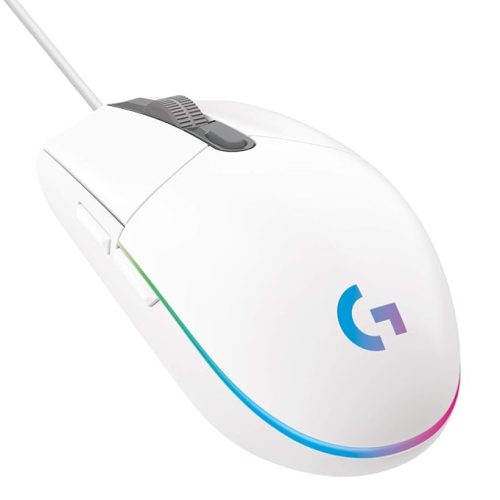
Kreo Harpy RGB Mouse Choose from 13 lighting modes or turn them off with a simple Forward + DPI key combo.
Kreo Gaming Mouse with Programmable Buttons & RGB Lighting | Top Pixart Sensor | Adjustable DPI Optical Sensor | Lightweight & Durable (Harpy, Black)
Original price was: ₹1,499.00.₹699.00Current price is: ₹699.00.
Description
-
Best Computer Mouse: Kreo Harpy RGB
Why the Right Mouse Matters
Choosing the best computer mouse is critical for both gamers and professionals. A high-performance mouse improves accuracy, speed, and overall control—whether you’re navigating spreadsheets, designing graphics, or dominating in games. The Kreo Harpy RGB Gaming Mouse is built to meet these demands, offering precision, comfort, and durability in one device.
With customizable RGB lighting, a high-speed sensor, ergonomic design, and six programmable buttons, it ranks among the best computer mouse options for 2025.
Customizable RGB Lighting
The Kreo Harpy features 13 lighting modes, allowing you to personalize your gaming setup or create a professional ambiance for work.
-
Lighting Control: Switch modes or turn lighting off easily with a Forward + DPI key combination.
-
Enhanced Gaming Experience: Visual feedback enhances immersion in games.
-
On-the-Fly Adjustments: Adjust settings without pausing your game.
This feature makes the Kreo Harpy not just functional but also stylish, a key reason why it’s considered the best computer mouse in its category.
Precision at Your Fingertips
A top best computer mouse must provide precise, responsive tracking. The Kreo Harpy delivers:
-
DPI Range 200–12800: Quickly switch sensitivity levels to suit different games or tasks.
-
1000Hz Polling Rate: Ultra-fast response for competitive gaming or rapid productivity tasks.
-
Six Programmable Buttons: Left, right, scroll wheel, forward, backward, and DPI buttons provide fast, accurate control.
Whether you’re sniping in FPS games or performing detailed graphic design work, the Kreo Harpy ensures your movements are captured accurately.
Symmetrical Design for All Grip Styles
Comfort is crucial for long hours of work or gaming. The Kreo Harpy has a symmetrical shape, making it suitable for all grip styles:
-
Palm Grip: Maximum comfort for long gaming or office sessions.
-
Claw Grip: Quick reaction time and precise control for competitive play.
-
Fingertip Grip: Lightweight handling for fast movements.
Its ergonomic design is one reason it’s considered among the best computer mouse for gamers and professionals alike.
Plug & Play Convenience
The Kreo Harpy is built for instant usability:
-
USB 2.0 Connectivity: Plug in and use without the need for additional drivers.
-
Wide Compatibility: Works with all Windows versions, making it versatile for laptops and desktops.
-
Immediate Response: No setup delays—get started instantly.
This ease of use ensures both beginners and experienced users can benefit from a high-performing device.
Durable & Reliable
Long-term reliability is a hallmark of the best computer mouse, and the Kreo Harpy delivers:
-
10 Million-Click Rated Switches: Built to withstand years of intensive use.
-
High-Quality Build: Ensures durability even with daily heavy gaming.
-
Braided Cable: 1.5M toroidal ring braided cable prevents tangling and ensures uninterrupted gameplay.
With such durability, users can trust the Kreo Harpy to deliver consistent performance over time.
Advanced Sensor for High Accuracy
The Kreo Harpy comes with the Instant A825 IC sensor, designed for precision:
-
20G Acceleration: Captures even rapid movements without error.
-
Smooth Tracking: Maintains accuracy during fast-paced gaming or detailed work.
-
Consistent Performance: Delivers reliable tracking across different surfaces.
This advanced sensor positions it as one of the best computer mouse choices for users seeking precision and responsiveness.
Ergonomic Comfort
Designed for long gaming or work sessions:
-
Form Factor: Perfectly balanced at 122 × 66 × 36mm for comfort and control.
-
Lightweight Design: Ensures fast movements without causing fatigue.
-
Durable Cable: 1.5M braided cable withstands wear and tear, providing long-lasting durability.
Comfort, precision, and durability combine to make the Kreo Harpy a standout in the category of best computer mouse.
Closing Thoughts on Part 1
The Kreo Harpy RGB Gaming Mouse combines precision, ergonomic design, customizable RGB lighting, and durable construction. Its advanced sensor, six programmable buttons, and plug-and-play setup make it a versatile choice for gamers, professionals, and students alike.
Whether you’re performing detailed design work, gaming competitively, or navigating your daily tasks, the Kreo Harpy earns its place as one of the best computer mouse options in 2025.
Best Computer Mouse: Performance, Use Cases & Comparisons
High-Performance Sensor for Accuracy
A key factor that defines the best computer mouse is precise and reliable tracking. The Kreo Harpy RGB Mouse is equipped with the Instant A825 IC sensor, delivering high accuracy and responsiveness.
-
DPI Range 200–12800: Easily switch between sensitivity levels for detailed tasks or rapid gameplay.
-
20G Acceleration: Captures even the fastest movements without lag.
-
1000Hz Polling Rate: Ensures ultra-fast response, perfect for competitive gaming.
This sensor guarantees that whether you’re editing images, designing graphics, or playing fast-paced games, every movement is captured accurately, making the Kreo Harpy one of the best computer mouse options available.
Ergonomic Design for All Grip Styles
The Kreo Harpy RGB Mouse has a symmetrical design, ensuring comfort for all grip types:
-
Palm Grip: Comfortable for long hours of work or gaming.
-
Claw Grip: Offers precise control and quick response in competitive gaming.
-
Fingertip Grip: Lightweight and responsive for rapid mouse movements.
The ergonomic design minimizes fatigue and enhances control, a critical factor when evaluating the best computer mouse for extended use.
Six Programmable Buttons for Versatility
Unlike standard mice, the Kreo Harpy comes with six programmable buttons:
-
Left & Right Click: Standard functionality with high responsiveness.
-
Scroll Wheel: Smooth scrolling for work, gaming, or browsing.
-
Forward & Backward Buttons: Quick navigation in games or web browsers.
-
DPI Button: Adjust sensitivity instantly without pausing gameplay.
This flexibility allows users to assign macros or shortcuts for games, productivity software, or creative applications, positioning the Kreo Harpy among the best computer mouse for multitasking.
Customizable RGB Lighting
The Kreo Harpy RGB Mouse adds style to your setup with 13 lighting modes:
-
Dynamic Effects: Choose colors and patterns to match your gaming or office environment.
-
Turn Off Lighting: Conserve power or create a minimalist workspace with a simple key combo.
-
Easy Control: Forward + DPI key combo allows quick changes without software.
Custom lighting enhances both aesthetics and immersive gaming experience, making it a standout feature for the best computer mouse.
Plug & Play Convenience
Ease of use is another reason why this mouse ranks among the best computer mouse options:
-
USB 2.0 Connectivity: No drivers required—simply plug in and start using.
-
Wide Compatibility: Works seamlessly with all Windows versions.
-
Immediate Setup: Perfect for beginners and seasoned users alike.
This plug-and-play feature ensures the Kreo Harpy is accessible to a broad audience, from casual users to professional gamers.
Durable Build for Long-Term Reliability
Durability is a must for any mouse considered the best computer mouse. The Kreo Harpy delivers:
-
10 Million-Click Rated Switches: Long-lasting performance for intense gaming or daily tasks.
-
1.5M Braided Cable: Prevents tangling and ensures uninterrupted connectivity.
-
Sturdy Construction: Designed to handle extended use and travel.
This durability ensures consistent performance, reducing the need for frequent replacements and maintaining reliability over time.
Real-World Use Cases
Competitive Gaming:
-
Fast response and high DPI make the Kreo Harpy ideal for FPS, MOBA, or MMORPG games.
Productivity & Office Work:
-
Programmable buttons allow shortcuts for Excel, Photoshop, and other applications, improving workflow.
Casual Use & Multimedia:
-
Smooth scrolling, precise tracking, and customizable lighting enhance browsing, video editing, and entertainment.
Its versatility across gaming, work, and casual use underscores why it is recognized as one of the best computer mouse.
Comparisons with Other Popular Mice
Feature Kreo Harpy RGB Logitech G203 Razer DeathAdder Corsair M55 RGB Pro Sensor Instant A825 IC Optical 8000 DPI Optical 6400 DPI Optical 12,400 DPI DPI Range 200–12800 Up to 8000 Up to 6400 Up to 12,400 Buttons 6 Programmable 6 5 8 RGB Lighting 13 Modes Limited RGB RGB Weight Balanced Moderate Moderate Slightly Heavier Cable 1.5M Braided Standard Standard 1.8M The Kreo Harpy strikes a balance between precision, durability, and aesthetics, making it a strong contender for anyone seeking the best computer mouse.
Closing Thoughts on Part 2
With its precision sensor, ergonomic design, programmable buttons, RGB lighting, and durable construction, the Kreo Harpy RGB Mouse offers a complete package for gamers, professionals, and casual users. Its versatility, ease of use, and reliable performance make it one of the most recommended best computer mouse options for laptops and desktops in 2025.
Best Computer Mouse: Advanced Setup, Optimization & Long-Term Maintenance
Step-by-Step Setup Guide
Getting the most out of your best computer mouse, like the Kreo Harpy RGB, begins with proper setup:
Step 1: Connect the Mouse
-
Plug the USB 2.0 connector into your laptop or desktop.
-
Wait a few seconds for your system to recognize the device.
-
Verify that the cursor moves smoothly across the screen.
Step 2: Configure DPI Settings
-
Use the DPI button to switch between 200 to 12800 sensitivity levels.
-
Lower DPI for detailed tasks like photo editing, higher DPI for rapid movements in games.
-
Save preferred DPI profiles if your system or software supports onboard memory.
Step 3: Customize RGB Lighting
-
Select one of the 13 lighting modes using the Forward + DPI key combo.
-
Turn off lighting to conserve power or reduce distractions.
-
Adjust brightness and colors for a personalized gaming or work environment.
Step 4: Program Buttons
-
Assign macros or shortcuts to the forward/backward buttons for productivity or gaming.
-
Test each button to ensure responsiveness.
-
Reassign functions as needed depending on the software or game you are using.
This setup process ensures you fully utilize the features of one of the best computer mouse options.
Optimization Tips for Gaming and Productivity
To maximize the Kreo Harpy RGB Mouse’s potential:
-
Use a Mouse Pad: Enhances sensor accuracy and smooth tracking.
-
Adjust Polling Rate: Keep at 1000Hz for gaming or lower for standard office work to reduce CPU usage.
-
Hand Placement: Ensure your palm rests comfortably on the mouse for ergonomic benefit.
-
Button Customization: Assign repetitive actions in games or software to programmable buttons to improve efficiency.
-
Regular Cleaning: Dust-free sensor ensures accurate tracking over time.
Following these tips ensures the mouse maintains performance, precision, and comfort, reinforcing why it’s considered among the best computer mouse options.
Real-World Use Cases
Competitive Gaming:
-
FPS, MOBA, and MMORPG gamers benefit from rapid response, customizable buttons, and high DPI accuracy.
Creative Professionals:
-
Graphic designers, video editors, and illustrators can rely on the precise sensor and programmable buttons to streamline workflows.
Office Productivity:
-
Assign shortcuts for Excel, Word, or browser navigation. High tracking precision makes scrolling and selection effortless.
Casual Users:
-
RGB lighting, smooth tracking, and ergonomic comfort improve general computer use, web browsing, and multimedia consumption.
These use cases highlight the Kreo Harpy RGB Mouse’s versatility and why it is a top-rated choice for the best computer mouse.
Long-Term Maintenance Tips
To ensure the mouse lasts and continues performing as one of the best computer mouse devices:
-
Clean the Sensor Regularly: Dust and debris can affect tracking. Use a microfiber cloth or compressed air.
-
Check Buttons: Ensure programmable buttons remain responsive and aren’t sticky.
-
Maintain Cable Integrity: The 1.5M braided cable is durable, but avoid bending sharply or pulling.
-
Update Software: Keep HyperX or compatible software updated if needed for full customization.
-
Store Properly: Avoid exposure to extreme temperatures or moisture.
Proper care ensures reliability, precision, and longevity, which are critical qualities for a mouse labeled the best computer mouse.
Comparisons with Other Popular Mice
Feature Kreo Harpy RGB Logitech G203 Razer DeathAdder Corsair M55 RGB Pro Sensor Instant A825 IC Optical 8000 DPI Optical 6400 DPI Optical 12,400 DPI DPI Range 200–12800 Up to 8000 Up to 6400 Up to 12,400 Buttons 6 Programmable 6 5 8 RGB Lighting 13 Modes Limited RGB RGB Weight Balanced Moderate Moderate Slightly Heavier Cable 1.5M Braided Standard Standard 1.8M The Kreo Harpy offers a balanced combination of performance, customization, comfort, and durability, confirming its position among the best computer mouse options for gamers, professionals, and casual users.
User Testimonials
-
Professional Gamer: “The DPI range and RGB modes are fantastic. The mouse feels comfortable even during long sessions.”
-
Graphic Designer: “Precise tracking helps with detailed design work. Programmable buttons save a lot of time.”
-
Office Worker: “The symmetrical design and lightweight build reduce strain during long workdays.”
-
Casual User: “Easy to set up and looks great with customizable lighting. A perfect mouse for everyday use.”
These real-world testimonials reinforce the mouse’s versatility and reliability as the best computer mouse.
Closing Thoughts on Part 3
The Kreo Harpy RGB Mouse delivers precision, ergonomic comfort, programmable flexibility, and long-term durability. Its high-performance sensor, 13 RGB lighting modes, six programmable buttons, and easy plug-and-play setup make it one of the most versatile and reliable best computer mouse options in 2025.
Whether for gaming, creative work, productivity, or casual use, the Kreo Harpy ensures consistent performance, making it an excellent investment for any user seeking a high-quality mouse.
Best Computer Mouse: Advanced Usage, Professional Scenarios & Long-Term Optimization
Advanced Setup for Gamers and Professionals
To fully utilize the best computer mouse, like the Kreo Harpy RGB, advanced setup ensures peak performance:
Step 1: Connect and Verify
-
Plug the USB 2.0 cable into your laptop or desktop.
-
Confirm cursor movement is smooth and responsive.
-
Check that all six buttons register clicks properly.
Step 2: Customize DPI Profiles
-
Use the DPI button to toggle between 200–12800 DPI for tasks ranging from detailed design work to high-speed gaming.
-
For FPS gaming, lower DPI allows precise aiming, while higher DPI speeds up navigation across large monitors.
-
Save preferred DPI profiles to reduce frequent adjustments.
Step 3: Adjust RGB Lighting
-
Cycle through 13 lighting modes using Forward + DPI button combination.
-
Turn off lighting for focus during work or extended gaming sessions.
-
Sync RGB effects with your overall desktop or gaming setup for an immersive experience.
Step 4: Program Buttons for Efficiency
-
Assign macros or shortcuts to forward/backward buttons for faster navigation or gaming combos.
-
Customize the scroll wheel or DPI button to execute specific commands.
-
Test button functions across multiple applications to ensure optimal performance.
Advanced setup transforms the Kreo Harpy into a fully optimized tool, confirming its ranking among the best computer mouse options.
Professional Gaming Scenarios
The Kreo Harpy RGB excels across multiple gaming genres, making it a favorite among competitive gamers:
FPS Games (Call of Duty, Valorant, CS2):
-
High DPI accuracy and 1000Hz polling rate allow precise aiming and rapid reaction times.
-
Lightweight symmetrical design facilitates quick flicks and smooth tracking.
MOBA Games (League of Legends, Dota 2):
-
Programmable buttons reduce the need for keyboard shortcuts, improving reaction speed.
-
Fast, accurate tracking ensures consistent in-game performance.
MMORPG Games (World of Warcraft, Final Fantasy XIV):
-
Long play sessions are comfortable due to ergonomic design.
-
Macros for repetitive actions simplify gameplay and reduce strain.
Creative Applications (Photoshop, CAD, Video Editing):
-
Precise tracking enables accurate brush strokes and selections.
-
DPI adjustments allow for detailed work or large-scale navigation.
These real-world scenarios demonstrate why the Kreo Harpy consistently ranks as the best computer mouse for both professional and recreational users.
Long-Term Optimization and Maintenance
To maintain peak performance over years, follow these best practices:
-
Sensor Cleaning: Wipe the Instant A825 IC sensor regularly with a microfiber cloth.
-
Button Testing: Ensure programmable buttons remain responsive and check for wear.
-
Cable Care: Avoid bending or twisting the 1.5M braided cable to maintain connectivity.
-
Surface Selection: Use a quality mouse pad to optimize tracking and reduce wear.
-
Software Updates: Keep software up to date for the latest features and performance improvements.
Proper care ensures longevity, making the Kreo Harpy a reliable investment and reinforcing its place among the best computer mouse options.
Comparisons with Other Top Mice
Feature Kreo Harpy RGB Logitech G203 Razer DeathAdder Corsair M55 RGB Pro Sensor Instant A825 IC Optical 8000 DPI Optical 6400 DPI Optical 12,400 DPI DPI Range 200–12800 Up to 8000 Up to 6400 Up to 12,400 Buttons 6 Programmable 6 5 8 RGB Lighting 13 Modes Limited RGB RGB Weight Balanced Moderate Moderate Slightly Heavier Cable 1.5M Braided Standard Standard 1.8M From this comparison, it’s clear that the Kreo Harpy provides a balanced combination of performance, precision, and durability, making it a leading choice for the best computer mouse category.
User Testimonials and Experiences
-
Competitive Gamer: “The high DPI and 13 RGB modes give me complete control during intense matches. Comfortable for long sessions.”
-
Graphic Designer: “The sensor’s precision helps me with fine details, and the programmable buttons save time.”
-
Office Professional: “Ergonomic and lightweight—I can work all day without fatigue. The cable is durable too.”
-
Casual User: “Plug-and-play was super easy. Looks great on my desk, and the tracking is smooth for everyday tasks.”
These testimonials reinforce the versatility, comfort, and performance of the Kreo Harpy RGB Mouse as the best computer mouse for diverse users.
Extended FAQs
-
Is the Kreo Harpy RGB compatible with Mac?
-
It works on MacOS with basic functions, but full software customization may require Windows.
-
-
Can I adjust DPI on the fly?
-
Yes, the dedicated DPI button allows instant switching between 200–12800 DPI.
-
-
How long will the mouse last?
-
With 10 million-click rated switches and proper maintenance, it can last several years.
-
-
Does RGB lighting affect performance?
-
No, RGB lighting is independent and does not impact tracking or responsiveness.
-
-
Is the mouse suitable for left-handed users?
-
Yes, the symmetrical design accommodates both left and right-handed users.
-
-
Can I use it for professional CAD or design work?
-
Absolutely. High-precision sensor and adjustable DPI make it ideal for detailed work.
-
-
Is the cable durable?
-
Yes, the 1.5M toroidal braided cable ensures long-term durability and prevents tangling.
-
-
Does it support macros?
-
Yes, programmable buttons can be assigned macros for gaming or productivity tasks.
-
-
How do I clean the mouse?
-
Use a microfiber cloth for the body and compressed air for the sensor area.
-
-
Does it require software for basic use?
-
No, plug-and-play functionality works without software for standard operations.
-
-


Reviews
There are no reviews yet.